Theaterplatz

© club L94 Landscape Architects
Current
- Construction is progressing, and traffic patterns are being adjusted: For more information, please see the press release dated July 16, 2026.
- Archaeological Finds at Theaterplatz: The archaeological work, including some of the original finds, was highlighted in an exhibition at the Planbar, Theaterplatz 7. “Historical Finds at Theaterplatz” ran through July 1, 26.
- Spectacular Discovery: In the spring of 2025, while working at Theaterplatz, archaeologists discovered, among other things, ancient monastic burial grounds. The results of the months-long excavations were on display starting April 29 in the exhibition “Traces of History: Historical Finds at Theaterplatz.”
- Traffic routing will change from February 2. More here.
- Information on the construction progress and current topics relating to the urban development measure can be found here and in the press release dated 29.01.2026.
City of Aachen / Stefan Herrmann
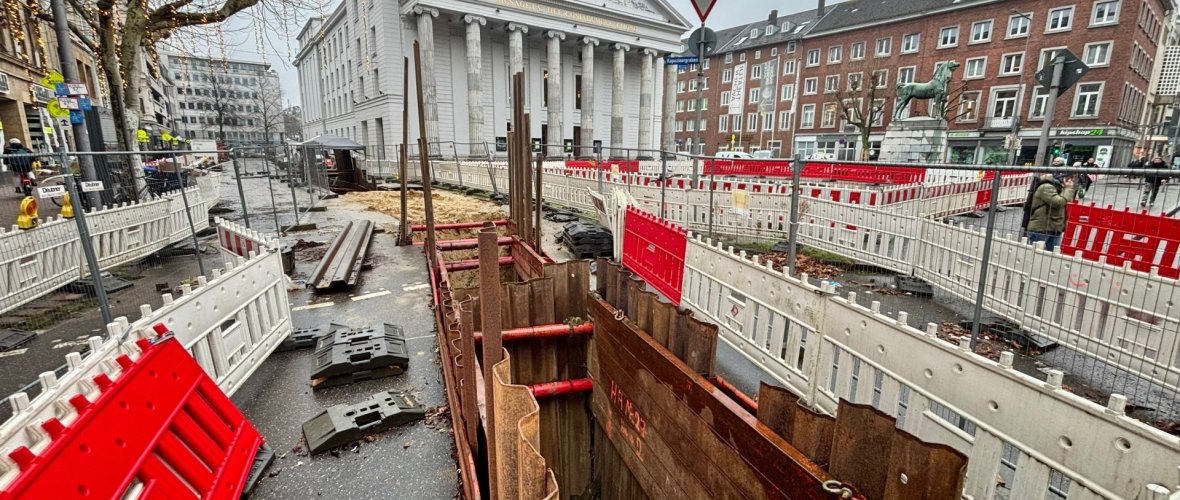
Theaterplatz01/03: Complex underground work: countless meters of supply and disposal lines have already been laid in the ground around the theater in recent months. Extensive archaeological finds have also been made. Photo: City of Aachen / Stefan Herrmann
Theaterplatz and parts of Theaterstraße will be redesigned for you from the beginning of 2025 to the end of 2027. All information about the measure at www.theaterplatz-aachen.de
Map
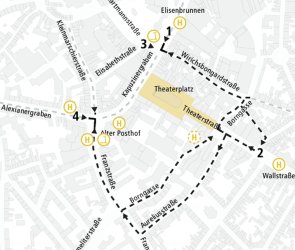
Information for Bicycle and E-Scooter Users
© City of Aachen / Kokonsult
To enhance the visitor experience at Theaterplatz and minimize disruptions for both restaurants and all road users, we ask that you take note of the following information:
1. Please be considerate: dismount before reaching the construction site, walk your bike, and continue on foot.
2. Additional parking areas have been set up outside the construction site for cyclists and e-scooter users.
3. Please avoid parking bicycles and e-scooters near the construction site, on streetlights, or near construction equipment.
4. Riding bicycles and e-scooters on sidewalks is a violation of traffic regulations.
For more information, please see our flyer.