Closure of Adenauerallee (Regionetz project)
News: Regionetz's construction
project will not begin until after the World Equestrian Games. You can find the latest press release regarding the postponement of the construction project here.
The sewer and the pipes on Adenauerallee, between Branderhofer Weg and Erzbergerallee, are showing their age and must be replaced by Regionetz. The work is expected to last until the end of the year. There will be a complete closure of traffic on the section mentioned.
The closure to motor vehicle traffic is necessary to complete the construction work as quickly as possible and to ensure safety at the construction site. For more information, please visit the Regionetz website.
City of Aachen
The Most Important Questions & Answers at a Glance
Why is it necessary to completely close Adenauerallee?
After weighing all factors, a full closure is the best solution. Particular attention should be paid to other time-sensitive construction sites in the vicinity (see below), the scope of the legally required construction site facilities, and the possibility of accelerating Regionetz’s construction project through the deployment of multiple work crews.
Were there any alternatives that were considered?
Yes, those were considered. The one-way traffic route along Adenauerallee was evaluated, both with construction zone signage and as a one-way route. Construction zone signage would lead to major traffic backups on the Outer Ring Road. Another alternative is to route traffic in both directions along Forster Weg. However, there are significant obstacles there due to built-in tree beds and the numerous vehicles parked along the roadside. Due to oncoming traffic—including that from ASEAG—all 52 parking spaces there would have to be eliminated, and the tree-lined narrowings would remain an obstacle.
When will the construction project begin?
The launch is scheduled for August 24, 2026.
Are there any other construction projects that were taken into account in the decisions regarding the start of construction and the full closure of Adenauerallee?
Yes, this includes, in particular, the necessary construction of a storm sewer in the street In den Zwanzigmorgen, which must be built to enable residents to move into the “gut-zusammen-aachen” housing project on Branderhofer Weg. Other measures include the bridge renovations by Autobahn GmbH on the A44 near Monschauer Straße, the renovation of the tunnel on Adenauerallee by Straßen.NRW and the construction project at Napoleonsberg in Kornelimünster, which are interdependent with regard to the detour routes.
For the same reasons, the project on Adenauerallee had to be postponed earlier due to the renovation of the Haarbachtal Bridge on the A 544, as the Outer Ring Road had to be available to serve as a diversion route.When deciding to implement a full road closure, are the concerns of residents along the detour route being ignored?
No, the concerns of all stakeholders are taken into account. This includes the concerns of residents along the construction site and the detour route, as well as those of commuters, commercial traffic, construction workers, and public transportation. In addition to all considerations regarding the specific measure on Adenauerallee, we are also taking into account which construction sites are temporally and geographically related to this measure. (See above.) To best address the concerns of residents, various measures are being implemented. These include a wide-area detour for through traffic, a local traffic management plan that requires the elimination of only a few parking spaces, the maintenance of public transportation connections, no additional signage for the changed traffic routing in the neighborhood, and guaranteed access to adjacent properties during the construction project. Throughout the entire construction project, the City of Aachen and Regionetz will monitor the progress of the work and remain available at all times.
Is it possible to keep one lane open on Adenauerallee for the duration of the construction project?
No. Taking all influencing factors into account, it is not possible to carry out the construction project without closing Adenauerallee. The applicable regulations specify safety clearances, which leave only a remaining lane width of 3.25 m. However, a minimum width of 3.50 m is required for one-way traffic; 4.50 m is recommended. In addition to the lack of width, it must be noted that during the construction project, service connections for the buildings on both sides of Adenauerallee must be installed, and the pipes in the utility facilities must be replaced. Some of these measures can be carried out in parallel during the full closure. This reduces both the construction time and the costs.
Is parking allowed on the side of the road within the construction zone?
No, that is not possible, as the entire street is needed for the construction site. However, the construction company will work with residents to find individual solutions as needed.
Will the water supply to the homes on Adenauerallee be interrupted during construction?
Generally speaking, no. During the construction project, the connection to the old sewer line will remain in place. However, brief service interruptions are unavoidable while the individual house connections are being switched over. Regionetz will provide advance notice of these interruptions. Residents affected by the construction project will receive separate letters detailing a contact person, including a phone number and email address, to whom they can direct any questions.
Is access to the houses on Adenauerallee guaranteed?
Yes, access to the properties on Adenauerallee will always be maintained. This applies to both residents and access for fire and emergency medical services.
Will residents be able to receive deliveries, such as furniture or other goods, during the construction project?
In principle, this is possible. Deliveries should be coordinated with the relevant contacts at Regionetz.
Will the traffic that normally flows along Adenauerallee be rerouted via a local detour?
No! Signs are posted at numerous locations throughout the road network indicating that the section of Adenauerallee between Branderhofer Weg and Erzbergerallee is closed and directing traffic to a wide-area detour. This is signposted both in the immediate vicinity and on the wider main road network, so that through traffic is diverted well in advance. For local traffic and public bus service, there are routes within the neighborhood that allow travel between Branderhofer Weg and Erzbergerallee. However, these are not signposted as detour routes.
How are residents in the area protected?
A wide-area detour will be set up for through traffic to divert vehicles well in advance. Local traffic and public transportation will each be routed in one-way traffic via Forster Weg and Am Branderhof. Through traffic on Buschhäuserweg will be blocked by road closures. Through traffic on Branderhofer Weg will be prohibited for trucks.
Will the revised traffic route through the residential area be signposted?
Apart from the extensive signage indicating the closure of Adenauerallee, no other signage will be posted. This is intended to keep additional traffic out of the neighborhood.
How will traffic in the neighborhood change?
Experience from other construction sites shows that, after an initial adjustment period, road users find new routes and through traffic is minimized.
Why isn't traffic allowed on In den Zwanzigmorgen Street?
The possibility of reversing the one-way street or closing it was considered, but this would result in significant detours for residents. It is expected that car traffic will be distributed between Forster Weg and Zwanzigmorgen, thereby reducing the traffic burden on both streets.
Was an on-site inspection conducted to verify that the traffic management plan is working?
Yes, site inspections were conducted by various representatives from the City of Aachen, Regionetz, and ASEAG. ASEAG inspected the route and confirmed that it is suitable for regular bus service.
Do the buses have to drive on the sidewalks to get along the route?
No. If that were the case, the route could not be used as a detour for the public bus. The route was assessed in this regard to ensure there was sufficient space. However, to ensure there is enough room for the buses to turn, no-stopping signs will be posted at certain locations.
How many parking spaces will be eliminated in the residential area?
Under the currently preferred traffic routing plan, 18 parking spaces would be eliminated. This would ensure that scheduled bus service continues. If traffic were rerouted in both directions via Forsterweg, 52 parking spaces would be eliminated.
Can the parking lot at the corner of Branderhofer Weg and Forsterweg be used to compensate for the lost parking spaces?
The parking lot is generally available for parking vehicles. At this time, residents do not have priority access to it. The city administration is looking into this. In addition, free parking spaces are available along Adenauerallee between Branderhofer Weg and Karl-Marx-Allee.
Where does the construction traffic for the Branderhof project go? Does it put additional strain on the local detour route?
Construction traffic for the development/building project at Am Gut Branderhof will use Branderhofer Weg and the construction site entrance there. Some traffic will leave the property via the streets In den Zwanzigmorgen and Am Römerhof and then be routed via Forster Weg and Branderhofer Weg to Adenauerallee. From there, it will continue on the higher-level, designated road network.
Will it be possible to carry out a planned building project at Am Branderhof?
For building construction projects that require temporary construction facilities on the street or that must make significant use of the street, a special use permit must be obtained from the Department of Motor Vehicles. This permit is granted after all relevant factors have been taken into account. You can find all the information you need about applying for a special use permit here.
Can the roads handle the additional traffic?
Yes. The extensive closure signage minimizes additional traffic. The roads are capable of handling this traffic.
Do residents living near the construction site have to expect that they will have to pay for road repairs in the event of damage?
No. Contributions toward new road construction and road rehabilitation have been abolished by law in North Rhine-Westphalia. Currently, the state of North Rhine-Westphalia provides a proportional reimbursement.
What is being done to ensure safety on the way to school?
The safety of children on their way to school is being taken into account in the planning. The City of Aachen is in contact with the Römerhof Elementary School regarding this matter. The traffic situation will also be monitored during the construction project, and if necessary, measures to address it will be formulated and implemented.
There are several facilities for people with disabilities in the area. These are also affected by the construction site and the detour routes. What is being done to make things easier for these people?
The city is in contact with these organizations. The impact on vulnerable groups will also be monitored during the construction project, and measures will be taken as necessary to address any issues.
How many vehicles usually drive down Adenauerallee?
A recent traffic survey conducted by the city is available. On January 29, 2026, a total traffic volume of 14,182 vehicles was recorded between 12:00 a.m. and 11:59 p.m. on the section between Karl-Marx-Allee and Branderhofer Weg. Of these, 7,032 were traveling toward Karl-Marx-Allee and 7,150 toward Branderhofer Weg. A total of 201 of these vehicles were trucks.
Is the city required to commission expert assessments for the homes adjacent to the detour route in order to identify potential damage caused by increased traffic?
No. The streets are designated for traffic flow and are intended for public use. This includes temporary increases in traffic resulting from construction sites. It is not to be expected that traffic diverted through the area will cause damage to adjacent properties. The obligation to preserve evidence of any damage to one’s own property rests with the owner.
Why wasn't a detour signposted in the residential area?
Through traffic traveling along Adenauerallee should not pass through the residential area in Beverau during the construction project, but should instead use the wide-area detour. This new route has been signposted, uploaded to navigation systems, and communicated to the public. A designated detour route must be planned and designed in such a way that it can safely and efficiently accommodate the additional traffic. This is also in accordance with the principles governing traffic management measures for detours that apply in North Rhine-Westphalia. Against this backdrop, a deliberate diversion of through traffic into the residential area—and thus into an existing 30-km/h zone—is not intended and cannot be considered an equivalent detour route under traffic law. Rather, the 30 km/h zone continues to serve the purpose of providing access to and protecting local residential traffic; it is not intended to become an alternative route for through traffic through additional signage or other traffic management measures. Experience has shown that through traffic undergoes an adjustment process here. Such a detour is then accepted after a few days.
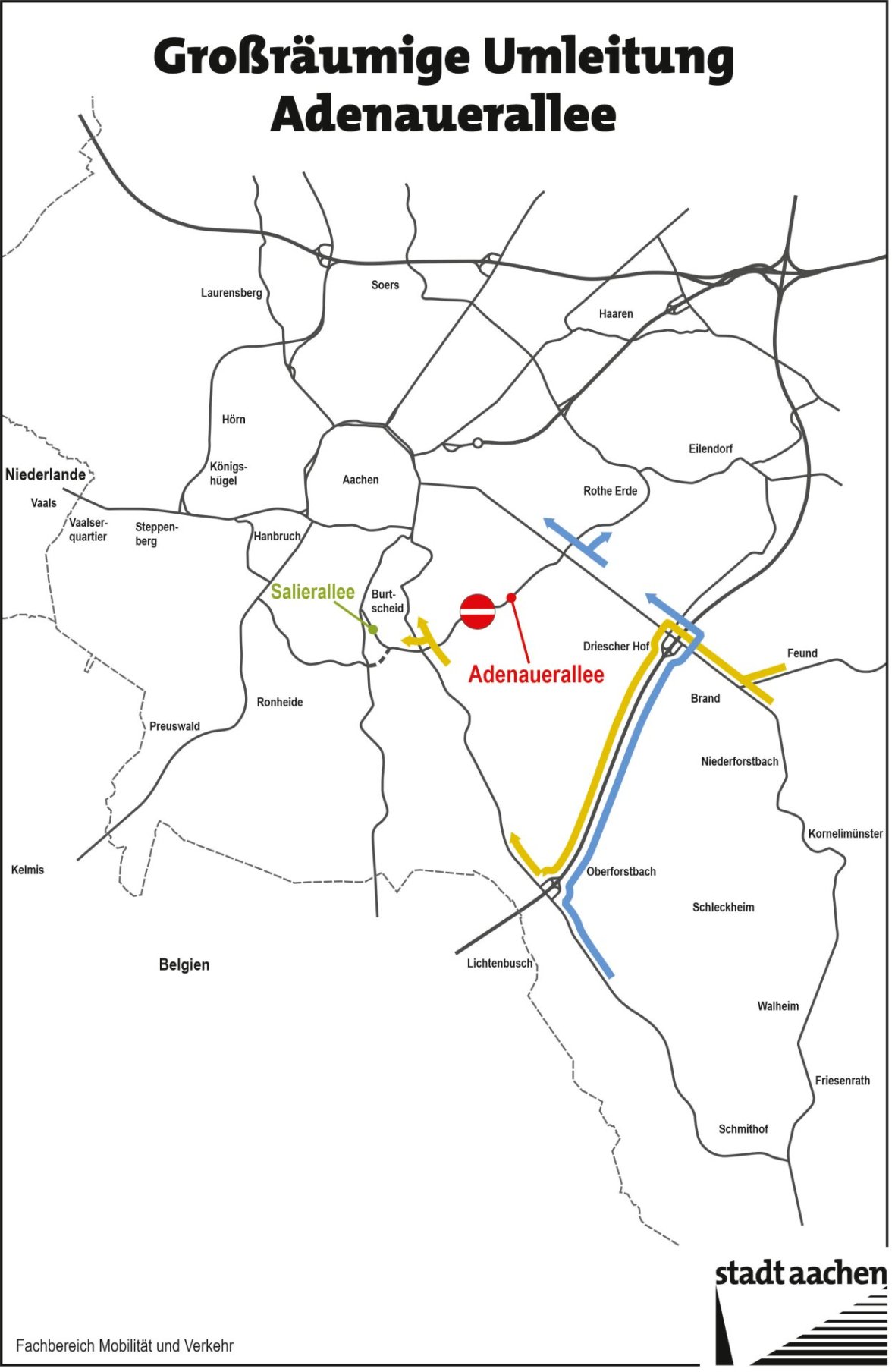
Detour
A wide-area detour will be signposted for the road closure in order to divert traffic to alternate routes in advance and keep traffic volume in the residential area to a minimum.
Melanie Schon, © City of Aachen
In addition, there will be a local traffic route running along Branderhofer Weg, Am Branderhof, Forster Weg (as one-way streets), and Erzbergerallee to maintain traffic flow in the area.
Public Information Sessions
The City of Aachen and Regionetz held two informational events to provide details about the construction project and the official detour routes.
You can find the presentations in the download section below.
The information session for local residents took place on July 2, 2026. The online event for all other affected parties took place on July 13, 2026.
You can find the official flyer here or in the download section below. You can find the official press release here.
PUBLIC TRANSPORT
Lines 10, 30, and 33 will be rerouted via local detour routes. If possible, please use alternative lines such as lines 21, 16, and 46.
For the Zwanzigmorgen, Beverau, Vogelsang, and Juttastraße stops, temporary stops will be set up on Forster Weg across from house no. 15 and on Adenauerallee behind the Branderhofer Weg intersection in the direction of Salierallee.
Real-time traffic data: the mobility dashboard
The City of Aachen's mobility dashboard provides you with up-to-date traffic information for various modes of transportation.
Routing: The City Navigator
The City of Aachen’s Stadtnavi offers an easy way to view alternative routes for your mode of transportation. It’s particularly useful for institutions that receive visitors to integrate Stadtnavi into their own websites as travel information. You can find instructions here or in the download section below.
If you have any questions or need custom maps for your location, please feel free to contact us at mobilitaetsmanagement@mail.aachen.de.
Use of Bicycles and Bike-Sharing
If possible, please try to switch to a bicycle to help reduce traffic congestion.
Residents can receive free rides on Euregiobike through the City of Aachen during the closure period. To do so, they can send an email to mobilitaetsmanagement@mail.aachen.de. There are
currently 62 Euregiobike stations available in Aachen. More stations are being set up on an ongoing basis. In the area around Adenauer Allee, the following Euregiobike stations are available where you can rent e-bikes: Tierpark, Karl-Marx-Allee 220, Burtscheid Ferber Park, Aachen Rothe Erde Station, and, a bit further away, Driescher Hof, Josefskirche, and Kennedypark.
All stations, including the number of available e-bikes, are displayed in the movA and Nextbike apps.
Carpooling with Karos (Go Flux)

© KAROS
The Karos app makes it easy to find and form carpool groups. Passengers pay a small fee through the app, while the driver receives this amount per kilometer. This helps reduce the number of vehicles on the road, allowing traffic to flow more smoothly. Plus, commuting together is more fun and saves time and money.
You can find the official flyer here, or in the download section below.
Carpooling for Businesses
Join the strong clever mobil network and enjoy free rides for your employees for a period of three months. For more information about the clever mobil program, visit: https://www.go-clever-mobil.de/karos-clever-mobil-fahrgemeinschaften/
Free Cargo Bike
There are over 20 cargo bikes in Aachen that can be borrowed free of charge. You can find information about locations, registering in the system, and the app here.
Use P&R parking lots
Use one of the four Park+Ride lots in Aachen—at Tivoli, Waldfriedhof, Westfriedhof, or on Jülicher Straße—to conveniently continue your journey into the city by bus. Up to five people can use the P+R ticket to travel to the city center and back.