Diese Seite wurde automatisch übersetzt. Es kann daher zu Abweichungen oder Ungenauigkeiten im Text kommen. Verbindlich ist ausschließlich die Originalfassung. Rechtsansprüche aus Inhalten der übersetzten Version sind ausgeschlossen.

Gringelsbach

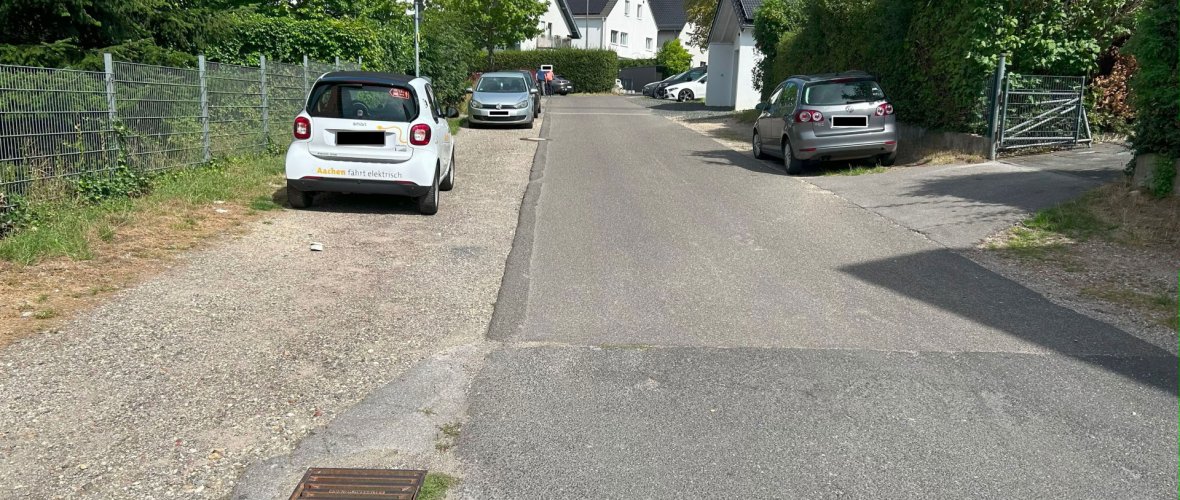
A View of the Gringelsbach
City of Aachen

Brief info

  • Project: Final Phase of the Gringelsbach Expansion
  • Goal: Final completion following the completion of building construction work
  • Project phase: Implementation planning

Current

Residents will be informed about the plans for the final phase of construction through a public information session. Subsequently, the implementation resolution will be sought.

Map

Occasion and goal

In the mid-1980s, Development Area 726 was designated between Heckenstraße and Von-Coels-Straße. Gringelsbach is a section of road in the southern part of this residential area, bordered on both sides by Von-Coels-Straße. In 2020, construction began on the last lot. Now that the building work is complete, the final construction of the traffic areas is set to begin.

Condition

The northern section of Gringelsbach Street has already been completed. It features a level-grade pavement surface, and the drainage channel is located at the one-third point. The southern connection is still in the temporary access road phase. The temporary access road is approximately 3.25 m wide.

Implementation planning

The plan calls for construction based on the separation principle for the section from Von-Coels-Straße to Station 0+046.5. On both sides, 2-meter-wide sidewalks will be constructed, separated by a high curb from the 5-meter-wide roadway and the 2-meter-wide parking lane. Two trees will be planted in this parking lane upon completion of the final construction phase. The existing access points in this section will be constructed using curb stones aligned with the curb line. Following this section built according to the separation principle, traffic will continue at the same level via a ramp.

Citizen participation

The public information session will take place shortly. Residents will be notified via flyers about the options and format of the session.

Costs

The administration estimates the total cost of the project at approximately €700,000. These estimated costs are subject to unforeseen circumstances.

Download

Contact us

No employees found.

Help with accessibility

  • General

    We make every effort to ensure that our websites are accessible. You can find details on this in our accessibility statement. You can send us suggestions for improvement using our"Report a barrier" feedback form.

  • Font size

    To adjust the font size, please use the following key combinations:

    Larger

    ⌘command
    +

    Smaller

    ⌘command
    –

    Larger

    Ctrl
    +

    Smaller

    Ctrl
    –
  • Keyboard navigation

    Use TAB and SHIFT + TAB to navigate through next/previous links, form elements and buttons.

    Use ENTER to open links and interact with elements.

  • Contrast mode

    Press the following key combination to reduce or increase the contrast:

    Enlarge

    ⌃control
    ⌥option
    ⌘command
    .

    Decrease

    ⌃control
    ⌥option
    ⌘command
    ,
    Note: The shortcuts must be activated in the system settings of the operating system.

    Press left ALT + left SHIFT + PRINT to quickly switch the high contrast mode on or off.

  • Invert colors

    Press the following key combination to switch the color inversion on and off:

    ⌃control
    ⌥option
    ⌘command
    8
    Note: The shortcuts must be activated in the system settings of the operating system.

    First activate the screen magnifier and then switch the color inversion on and off with the following key combinations:

    1. screen magnifier

    +

    2. invert colors

    Ctrl
    Old
    I
  • Screen magnifier

    Press the following key combinations to use the screen magnifier:

    Switch on/off

    ⌥option
    ⌘command
    8

    Enlarge view

    ⌥option
    ⌘command
    =

    Reduce view

    ⌥option
    ⌘command
    –
    Note: The shortcuts must be activated in the system settings of the operating system.

    Switch on / Enlarge view

    +

    Reduce view

    –