Diese Seite wurde automatisch übersetzt. Es kann daher zu Abweichungen oder Ungenauigkeiten im Text kommen. Verbindlich ist ausschließlich die Originalfassung. Rechtsansprüche aus Inhalten der übersetzten Version sind ausgeschlossen.

Press releases

Explosive ordnance found in Franzstrasse:
How does the evacuation work?

Following the discovery of a World War II bomb in Franzstraße, experts from the Explosive Ordnance Disposal Service (KBD) have set an evacuation radius of 400 meters. Everyone within this area must leave their buildings.

Emergency services from the municipal public order office and the fire department will be going from house to house from 9 a.m. onwards to ensure that everyone is informed.

Residents must leave their homes. For people who cannot stay with friends or relatives, the Tivoli is open from 9 a.m. as an emergency shelter. People who are bedridden or require assistance will be evacuated by ambulance. The area must be completely evacuated before defusing can begin.

Local public transport will also be suspended in the restricted area. Detour have been set up. Trains will no longer stop at the main station from 9 am. All roads in the restricted area will be closed.

The duration of the defusing process can vary from half an hour to several hours, depending on the condition of the detonators. After successful completion, the lockdown will be lifted and the city of Aachen will inform the affected persons that they can return to their homes.
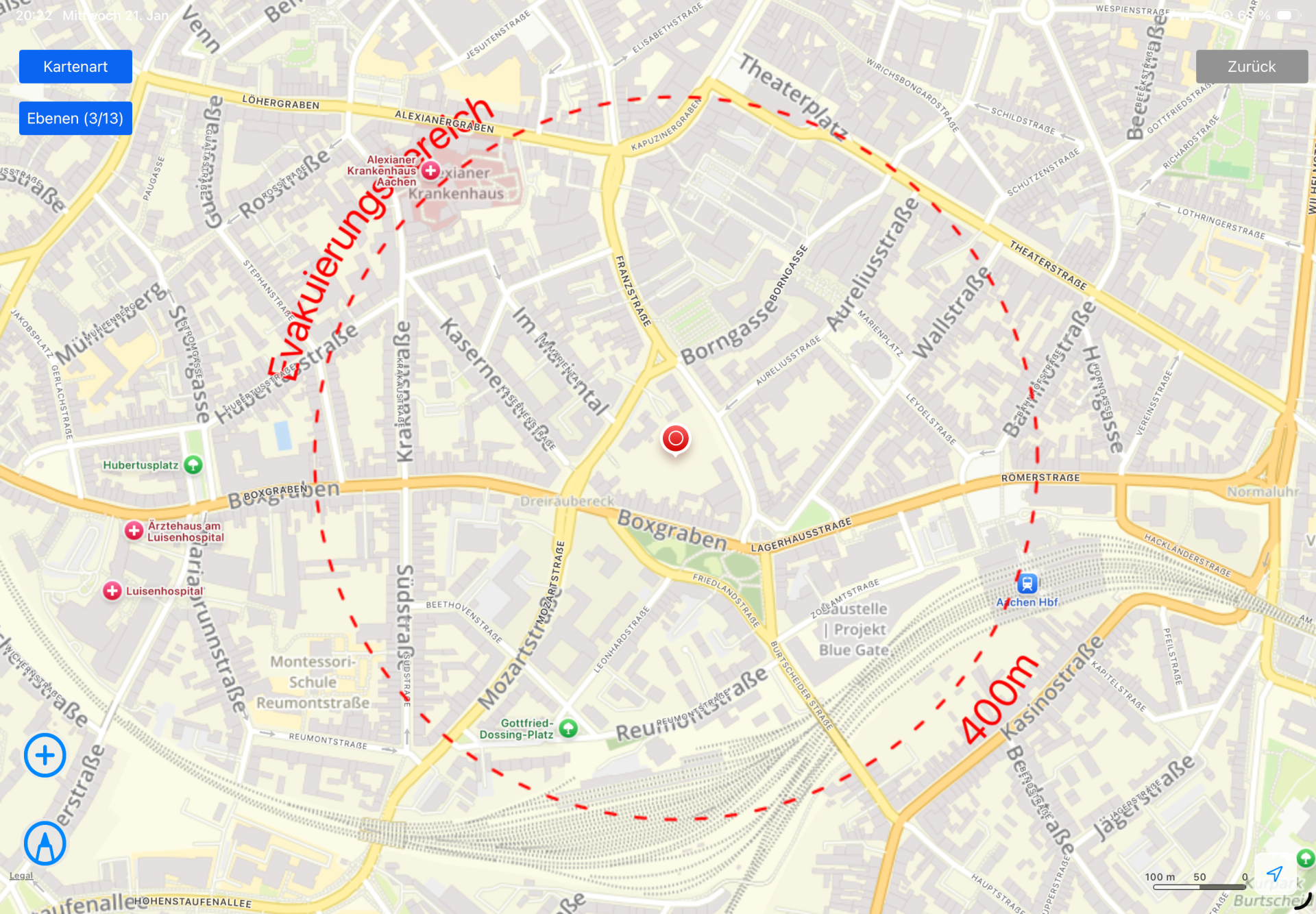
Explosive ordnance found: on January 22, an area within a radius of 400 meters around the explosive ordnance will be cleared from 9 am.


You can subscribe to our RSS feed for our press releases here https://www.aachen.de/rss-feed-pressemitteilungen/rss.xml

Help with accessibility

  • General

    We make every effort to ensure that our websites are accessible. You can find details on this in our accessibility statement. You can send us suggestions for improvement using our"Report a barrier" feedback form.

  • Font size

    To adjust the font size, please use the following key combinations:

    Larger

    ⌘command
    +

    Smaller

    ⌘command

    Larger

    Ctrl
    +

    Smaller

    Ctrl
  • Keyboard navigation

    Use TAB and SHIFT + TAB to navigate through next/previous links, form elements and buttons.

    Use ENTER to open links and interact with elements.

  • Contrast mode

    Press the following key combination to reduce or increase the contrast:

    Enlarge

    ⌃control
    ⌥option
    ⌘command
    .

    Decrease

    ⌃control
    ⌥option
    ⌘command
    ,
    Note: The shortcuts must be activated in the system settings of the operating system.

    Press left ALT + left SHIFT + PRINT to quickly switch the high contrast mode on or off.

  • Invert colors

    Press the following key combination to switch the color inversion on and off:

    ⌃control
    ⌥option
    ⌘command
    8
    Note: The shortcuts must be activated in the system settings of the operating system.

    First activate the screen magnifier and then switch the color inversion on and off with the following key combinations:

    1. screen magnifier

    +

    2. invert colors

    Ctrl
    Old
    I
  • Screen magnifier

    Press the following key combinations to use the screen magnifier:

    Switch on/off

    ⌥option
    ⌘command
    8

    Enlarge view

    ⌥option
    ⌘command
    =

    Reduce view

    ⌥option
    ⌘command
    Note: The shortcuts must be activated in the system settings of the operating system.

    Switch on / Enlarge view

    +

    Reduce view