Diese Seite wurde automatisch übersetzt. Es kann daher zu Abweichungen oder Ungenauigkeiten im Text kommen. Verbindlich ist ausschließlich die Originalfassung. Rechtsansprüche aus Inhalten der übersetzten Version sind ausgeschlossen.

New pavilion GGS Am Höfling 2026

Therapy pavilion


In the project phase timeline, this project is in the construction planning phase.
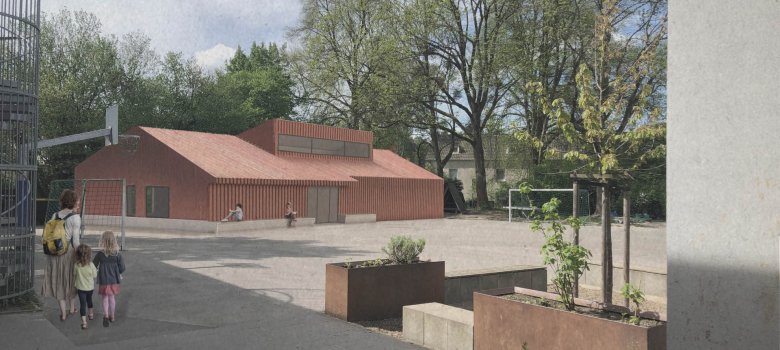
Perspective


Occasion and goal

A new therapy pavilion replaces the outdated pavilion from the 1980s. The elemental timber construction combines sustainable construction with a significantly shorter construction time.

  • Key data

    • Therapy, speech therapy and multipurpose room
    • Social work office
    • Elemental timber construction with clay walls as storage mass
    • Metal façade
    • Heat pump
    • NF: 197sqm
    • Architects: Knapp & Knapp
    • HLS specialist planning: Schneider
    • Specialist planning ELT: TN Nießen
    • Planned completion: 2026/27

Description

New Foundation
The old foundation was not structurally sound, and the footprint could not accommodate the new design. The new foundation made it possible to create ground-level, barrier-free access.

Building footprint and location:
The fire department access road and the canopy area of the existing trees define the design footprint.

Design
: The design incorporates design elements from the listed main building, such as the roof shape and colors.
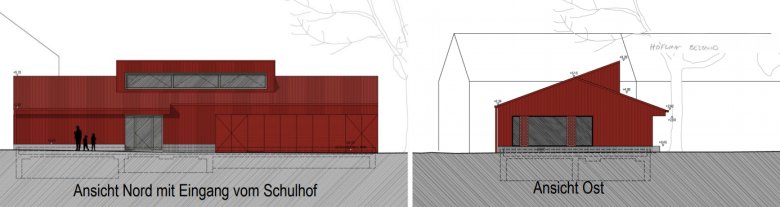
Views
Views

Floor Plan
: From the schoolyard, a vestibule leads into the central hallway. The therapy rooms are located on the side facing away from the schoolyard, while the large multipurpose room is situated at the front of the building, with a facade that is closed off from the schoolyard.

A room for playground equipment is accessible from the schoolyard, as is the secure housing for the heat pump.

Lighting and CeilingsDaylight streams into
the central hallway through the dormer window. The small rooms will feature suspended ceilings, while the large multipurpose room at the far end and the therapy room will have exposed roof structures.
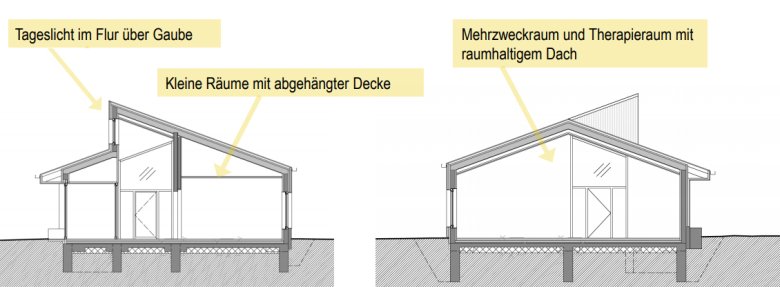
Exposure concept
Exposure concept


Construction and Materials:
This is a modular timber-frame structure featuring prefabricated timber-frame walls, clay panels, and a clay finish.

The façade is a durable metal façade in the color of the existing building.

Linoleum flooring, wood wool acoustic panels and wood and steel frames provide the colors for the interior fittings.
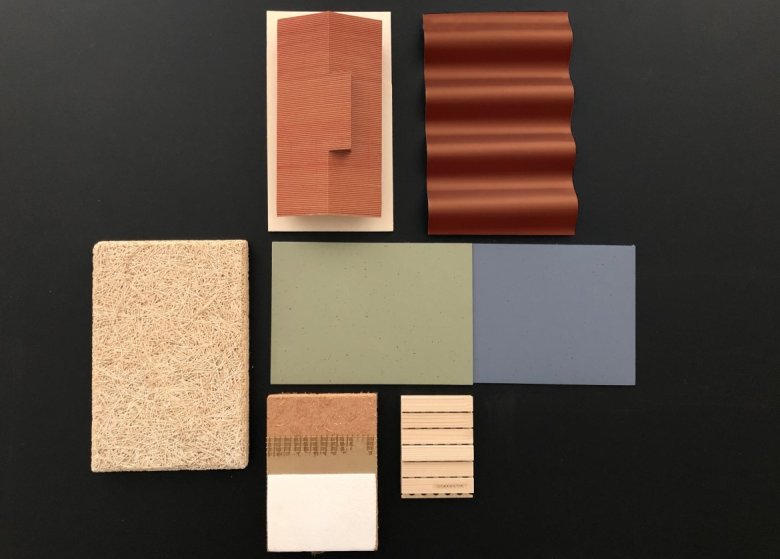
Moodboard: Material selection

Help with accessibility

  • General

    We make every effort to ensure that our websites are accessible. You can find details on this in our accessibility statement. You can send us suggestions for improvement using our"Report a barrier" feedback form.

  • Font size

    To adjust the font size, please use the following key combinations:

    Larger

    ⌘command
    +

    Smaller

    ⌘command

    Larger

    Ctrl
    +

    Smaller

    Ctrl
  • Keyboard navigation

    Use TAB and SHIFT + TAB to navigate through next/previous links, form elements and buttons.

    Use ENTER to open links and interact with elements.

  • Contrast mode

    Press the following key combination to reduce or increase the contrast:

    Enlarge

    ⌃control
    ⌥option
    ⌘command
    .

    Decrease

    ⌃control
    ⌥option
    ⌘command
    ,
    Note: The shortcuts must be activated in the system settings of the operating system.

    Press left ALT + left SHIFT + PRINT to quickly switch the high contrast mode on or off.

  • Invert colors

    Press the following key combination to switch the color inversion on and off:

    ⌃control
    ⌥option
    ⌘command
    8
    Note: The shortcuts must be activated in the system settings of the operating system.

    First activate the screen magnifier and then switch the color inversion on and off with the following key combinations:

    1. screen magnifier

    +

    2. invert colors

    Ctrl
    Old
    I
  • Screen magnifier

    Press the following key combinations to use the screen magnifier:

    Switch on/off

    ⌥option
    ⌘command
    8

    Enlarge view

    ⌥option
    ⌘command
    =

    Reduce view

    ⌥option
    ⌘command
    Note: The shortcuts must be activated in the system settings of the operating system.

    Switch on / Enlarge view

    +

    Reduce view