Diese Seite wurde automatisch übersetzt. Es kann daher zu Abweichungen oder Ungenauigkeiten im Text kommen. Verbindlich ist ausschließlich die Originalfassung. Rechtsansprüche aus Inhalten der übersetzten Version sind ausgeschlossen.

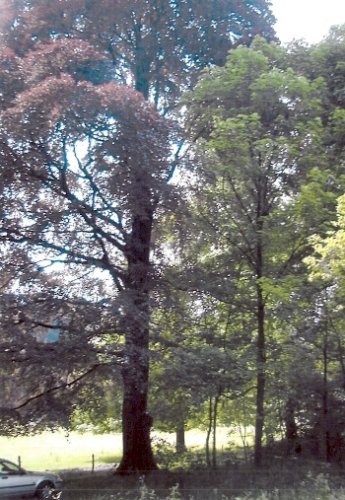
European beech, St. Rafael Monastery Park

Tree species: European beech (Fagus sylvatica f. purpurea)
Location: Monastery Park, St. Rafael
Trunk circumference: 3.70 meters
Trunk height: 30 meters
Age: around 200 years old

This copper beech does not have green leaves as usual, but its foliage is colored red due to a natural mutation. The red leaves lack an enzyme that breaks down the red pigments (anthocyanins) found in young leaves. As a result, the green inside the leaf is no longer visible. These copper beeches are therefore also known as copper beeches. Over the course of the year, copper beeches lose their characteristic red color, they gradually turn green and often look just like all other (copper) beeches in autumn.

European copper beeches can only be propagated by seed with a low degree of certainty, as this mutation is a real freak of nature. To reproduce copper beeches, they are therefore usually propagated by grafting. There are even theories that all copper beeches originate from a mutated tree from the 17th century ...
European beech

Help with accessibility

  • General

    We make every effort to ensure that our websites are accessible. You can find details on this in our accessibility statement. You can send us suggestions for improvement using our"Report a barrier" feedback form.

  • Font size

    To adjust the font size, please use the following key combinations:

    Larger

    ⌘command
    +

    Smaller

    ⌘command

    Larger

    Ctrl
    +

    Smaller

    Ctrl
  • Keyboard navigation

    Use TAB and SHIFT + TAB to navigate through next/previous links, form elements and buttons.

    Use ENTER to open links and interact with elements.

  • Contrast mode

    Press the following key combination to reduce or increase the contrast:

    Enlarge

    ⌃control
    ⌥option
    ⌘command
    .

    Decrease

    ⌃control
    ⌥option
    ⌘command
    ,
    Note: The shortcuts must be activated in the system settings of the operating system.

    Press left ALT + left SHIFT + PRINT to quickly switch the high contrast mode on or off.

  • Invert colors

    Press the following key combination to switch the color inversion on and off:

    ⌃control
    ⌥option
    ⌘command
    8
    Note: The shortcuts must be activated in the system settings of the operating system.

    First activate the screen magnifier and then switch the color inversion on and off with the following key combinations:

    1. screen magnifier

    +

    2. invert colors

    Ctrl
    Old
    I
  • Screen magnifier

    Press the following key combinations to use the screen magnifier:

    Switch on/off

    ⌥option
    ⌘command
    8

    Enlarge view

    ⌥option
    ⌘command
    =

    Reduce view

    ⌥option
    ⌘command
    Note: The shortcuts must be activated in the system settings of the operating system.

    Switch on / Enlarge view

    +

    Reduce view