Diese Seite wurde automatisch übersetzt. Es kann daher zu Abweichungen oder Ungenauigkeiten im Text kommen. Verbindlich ist ausschließlich die Originalfassung. Rechtsansprüche aus Inhalten der übersetzten Version sind ausgeschlossen.

Giant sequoia, city garden, Passstrasse

Tree species: Giant sequoia (Sequoiadendron giganteum)
Location: Stadtgarten, Passstraße
Trunk circumference: 6.30 meters
Trunk height: 30 meters
Age: around 150 years old

This giant sequoia stands alone in a large meadow and therefore has an impressive park design effect. The tree is around 150 years old. Sequoias originally come from North America, where they are also known as redwoods because of the color of their wood. On the western slopes of the Sierra Navada, there are specimens in some national parks that are over 1500 years old. As these giants have been on earth for 110 million years, they are also known as living fossils.

The fibrous bark of the sequoia can be 30 to 75 centimetres thick, contains no resin and is very soft. The fire-resistant bark can even protect the tree from forest fires by secreting a liquid when it gets hot, which then covers the outer skin protectively. Sequoias even need regular forest fires to reproduce: the rising heat of the fire causes the cones to open and the seeds to fall onto exposed, light-flooded soil fertilized with ash.
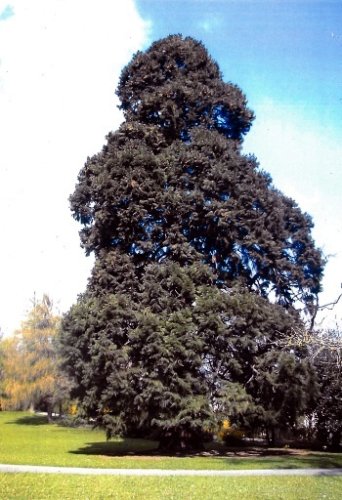
Sequoia

Help with accessibility

  • General

    We make every effort to ensure that our websites are accessible. You can find details on this in our accessibility statement. You can send us suggestions for improvement using our"Report a barrier" feedback form.

  • Font size

    To adjust the font size, please use the following key combinations:

    Larger

    ⌘command
    +

    Smaller

    ⌘command

    Larger

    Ctrl
    +

    Smaller

    Ctrl
  • Keyboard navigation

    Use TAB and SHIFT + TAB to navigate through next/previous links, form elements and buttons.

    Use ENTER to open links and interact with elements.

  • Contrast mode

    Press the following key combination to reduce or increase the contrast:

    Enlarge

    ⌃control
    ⌥option
    ⌘command
    .

    Decrease

    ⌃control
    ⌥option
    ⌘command
    ,
    Note: The shortcuts must be activated in the system settings of the operating system.

    Press left ALT + left SHIFT + PRINT to quickly switch the high contrast mode on or off.

  • Invert colors

    Press the following key combination to switch the color inversion on and off:

    ⌃control
    ⌥option
    ⌘command
    8
    Note: The shortcuts must be activated in the system settings of the operating system.

    First activate the screen magnifier and then switch the color inversion on and off with the following key combinations:

    1. screen magnifier

    +

    2. invert colors

    Ctrl
    Old
    I
  • Screen magnifier

    Press the following key combinations to use the screen magnifier:

    Switch on/off

    ⌥option
    ⌘command
    8

    Enlarge view

    ⌥option
    ⌘command
    =

    Reduce view

    ⌥option
    ⌘command
    Note: The shortcuts must be activated in the system settings of the operating system.

    Switch on / Enlarge view

    +

    Reduce view