The city of Aachen is increasingly focusing on green roofs - and for good reason: they are a key component of a liveable, climate-adapted city.

© AdobeStock_158889920, License Luisa Strehl
Why Green
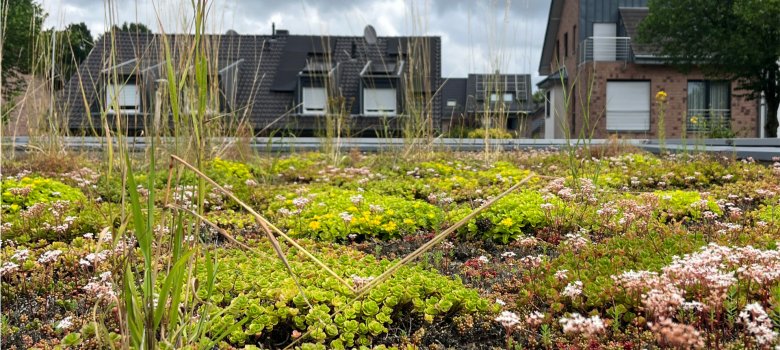
Roofs? Green roofs are much more than just an aesthetic feature. They make an important contribution to the so-called “green infrastructure” of the city of Aachen. Together with trees, green facades, and unpaved areas, they noticeably improve the urban climate as well as local conditions in terms of temperature regulation and heavy rain management.
The most important advantages at a glance:
- Cooling of buildings and surroundings
- Improving air quality
- Rainwater storage (relief of the sewer system)
- Sound insulation and thermal insulation
- Promotion of biodiversity
- New recreational and adventure spaces (e.g. roof gardens)

A Clear Strategy for Building ManagementFor
years, the city’s building management department has been pursuing a consistent greening strategy.
As early as 2017, the municipal ordinance stipulated that new roofs larger than 200 m² must be greened. >> Aachen’s Green and Design Ordinance.
Green roofs are no longer just standard in new buildings, but also play an important role in heat and heavy rain prevention in existing buildings and renovations.
Photovoltaic green roofs, which intelligently combine greenery and solar energy, are particularly forward-looking.

© AdobeStock_616726733, License Luisa Strehl, StAC
Existing roofs
Leveraging Existing Assets – Unlocking
PotentialExisting buildings also hold enormous potential. Many roofs can be converted into green roofs—even without major structural modifications.Prerequisites include:
- Sufficient insulation
- intact seal
- static suitability
To make targeted use of these opportunities, suitable roofs are systematically assessed. Funding for implementation is made available annually through >> climate protection programs.Key data
The numbers show: We're making progress
. The facilities management team is already managing:- 28 Buildings with green roofs
- Around 14,000 m² of green roof area
- including several photovoltaic green roofs
- as well as the first biodiversity roof with a special ecological focus in the form of a >> rooftop garden on the Am Marschiertor administrative building.
Many school buildings are already part of this trend. The >> Green Roof Catalog for School Green Roofs showcases green roofs at 15 schools in the city of Aachen.Care
Ensuring Quality – Maintaining
EffectivenessA green roof only has a positive impact on the climate if the vegetation is healthy. That is why great importance is placed on maintenance and quality standards.New measures include:
- Standardized care concepts
- Central organization of care services
- clear quality criteria
The aim is not only to preserve existing roofs, but also to develop them ecologically.
Looking Ahead: Innovation and
ChallengesDevelopment continues—with new approaches and growing demands:
- Biodiversity roofs specifically promote plant and animal species
- Retention roofs also store rainwater
- Sloped roofs are visible from the ground
- Roof gardens bring nature to life

© AdobeStock_1733831791, License Luisa Strehl, StAC
At the same time, new challenges are arising for building management:
- Competition between greening and photovoltaics
- Increasing demands on statics and planning
- Growing maintenance effort
Conclusion: Small areas, big impact.
Green roofs are a powerful tool for climate protection, quality of life, and sustainable urban development.
With a clear strategy, growing experience and innovative concepts, the City of Aachen's building management team shows how municipal buildings can actively contribute to the green transformation.
Green Roofs – Catalog
In the "Building Greenery" catalog, the City of Aachen's Building Management Department presents the greening projects at 28 municipal properties. For each property, the catalog includes photos as well as information on the type of greening, substrate thickness, area size, special features, and development potential.
Based on this catalog, it was possible not only to conduct a comprehensive inventory but also to develop a property-specific maintenance plan. The catalog was updated in 2026.