Diese Seite wurde automatisch übersetzt. Es kann daher zu Abweichungen oder Ungenauigkeiten im Text kommen. Verbindlich ist ausschließlich die Originalfassung. Rechtsansprüche aus Inhalten der übersetzten Version sind ausgeschlossen.

Amendment to the AACHEN*2030 land use plan - Soers / Mitte sports park

Brief info

  • Project: Amendment to the AACHEN*2030 land use plan - Soers / Mitte sports park -
  • Location: Aachen-Mitte district in the area between Eulersweg, Hubert-Wienen-Straße, Krefelder Straße, Am Sportpark Soers and Soerser Weg
  • Size: approx. 37 ha
  • Planned use: Special area with the purpose of "sport, leisure and culture" (SO-SFK 2.I -Sportpark Soers / Mitte)
  • Project phase: Publication on the Internet

Current

Publication on the Internet and Additional Public Review
: The public participation period runs from September 28, 2026, to October 28, 2026. (Publication period)
Publication on the Internet: via the central Internet portal of the State of North Rhine-Westphalia. The documents to be published and the content of the notice are available via the central Internet portal of the State of North Rhine-Westphalia at beteiligung.nrw.de and at beteiligung.aachen.de

Location of the additional public display of the plan (pursuant to Section 3(2), second sentence, of the BauGB): Am Marschiertor Administrative
Building, Lagerhausstraße 20, 4th floor, Room 400
(Opening hours: Monday through Thursday from 8:00 a.m. to 12:30 p.m. and from 1:30 p.m. to 4:00 p.m., Wednesdays until 5:00 p.m., Fridays from 8:00 a.m. to 1:00 p.m.)

Map
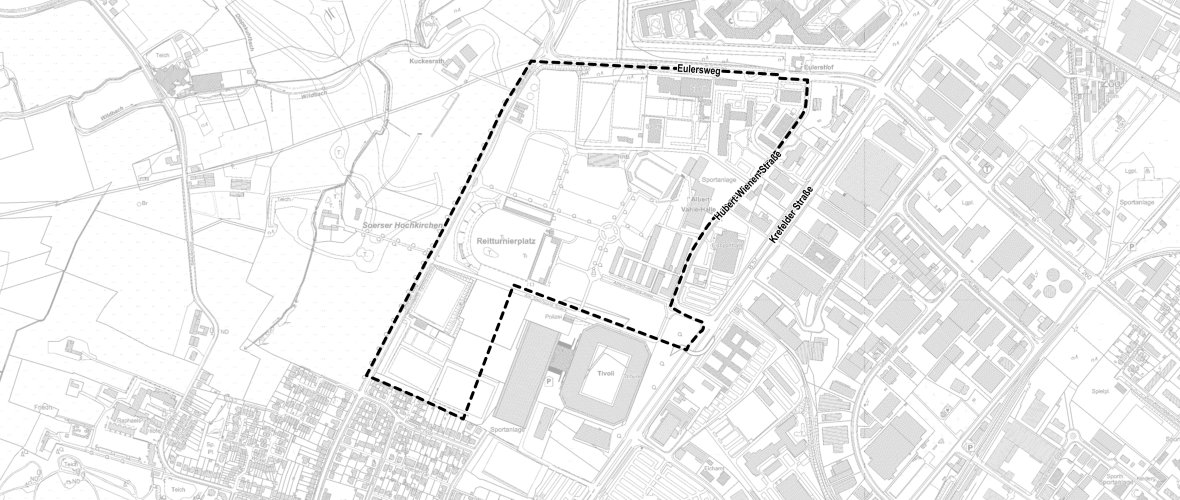
Black and white map with the outline of the FNP Sportpark Soers area
© Official base map, State of NRW

History

The early public participation period took place from October 27, 2025, to November 28, 2025. The documents were published on the central Internet portal of the state of North Rhine-Westphalia.

Contact us

No employees found.

Email address:
abteilung.stadtentwicklung@mail.aachen.de


Help with accessibility

  • General

    We make every effort to ensure that our websites are accessible. You can find details on this in our accessibility statement. You can send us suggestions for improvement using our"Report a barrier" feedback form.

  • Font size

    To adjust the font size, please use the following key combinations:

    Larger

    ⌘command
    +

    Smaller

    ⌘command
    –

    Larger

    Ctrl
    +

    Smaller

    Ctrl
    –
  • Keyboard navigation

    Use TAB and SHIFT + TAB to navigate through next/previous links, form elements and buttons.

    Use ENTER to open links and interact with elements.

  • Contrast mode

    Press the following key combination to reduce or increase the contrast:

    Enlarge

    ⌃control
    ⌥option
    ⌘command
    .

    Decrease

    ⌃control
    ⌥option
    ⌘command
    ,
    Note: The shortcuts must be activated in the system settings of the operating system.

    Press left ALT + left SHIFT + PRINT to quickly switch the high contrast mode on or off.

  • Invert colors

    Press the following key combination to switch the color inversion on and off:

    ⌃control
    ⌥option
    ⌘command
    8
    Note: The shortcuts must be activated in the system settings of the operating system.

    First activate the screen magnifier and then switch the color inversion on and off with the following key combinations:

    1. screen magnifier

    +

    2. invert colors

    Ctrl
    Old
    I
  • Screen magnifier

    Press the following key combinations to use the screen magnifier:

    Switch on/off

    ⌥option
    ⌘command
    8

    Enlarge view

    ⌥option
    ⌘command
    =

    Reduce view

    ⌥option
    ⌘command
    –
    Note: The shortcuts must be activated in the system settings of the operating system.

    Switch on / Enlarge view

    +

    Reduce view

    –