Status: April 2023
The Vaals Cycle Priority Route (RVR) connects the neighboring Dutch municipality of Vaals to Aachen city center over a distance of 4.0 km. The route begins on Vaalser Straße at the national border with the Netherlands. A decision to redesign this part of Vaalser Straße is expected to be made in June 2022. Further information can be found here.
The cycle priority route runs along Vaalser Straße as far as the junction with Weststraße. Cycle traffic is currently routed along a cycle path that is physically separated from motor vehicle traffic. However, large sections of this cycle path no longer meet today's requirements in terms of width and surface quality. The dimensions of the adjacent footpaths and the demarcation between the cycle lane and footpath are also often inadequate. The RVR connects the residential areas of Vaalserquartier, Steppenberg and Kronenberg on this section. At Kronenberg, the route turns off into Weststraße and runs through quiet side streets that are to be upgraded to cycle routes: First it goes through Weststraße, then the route is routed around Westpark via Welkenrather Straße and the "small" Gartenstraße. Cycling through the Westpark will still be permitted, but cyclists will have to clearly subordinate themselves to pedestrians, as the Westpark is primarily a place for park visitors to relax. If you want to move more quickly, take the recommended route described above. The last section to Grabenring runs through Lochnerstraße, which is also to be converted into a cycle lane. The cycle priority route is overlaid here with the premium footpath 8 (Westpark). In future, street trees are to be planted between Junkerstraße and Karlsgraben.
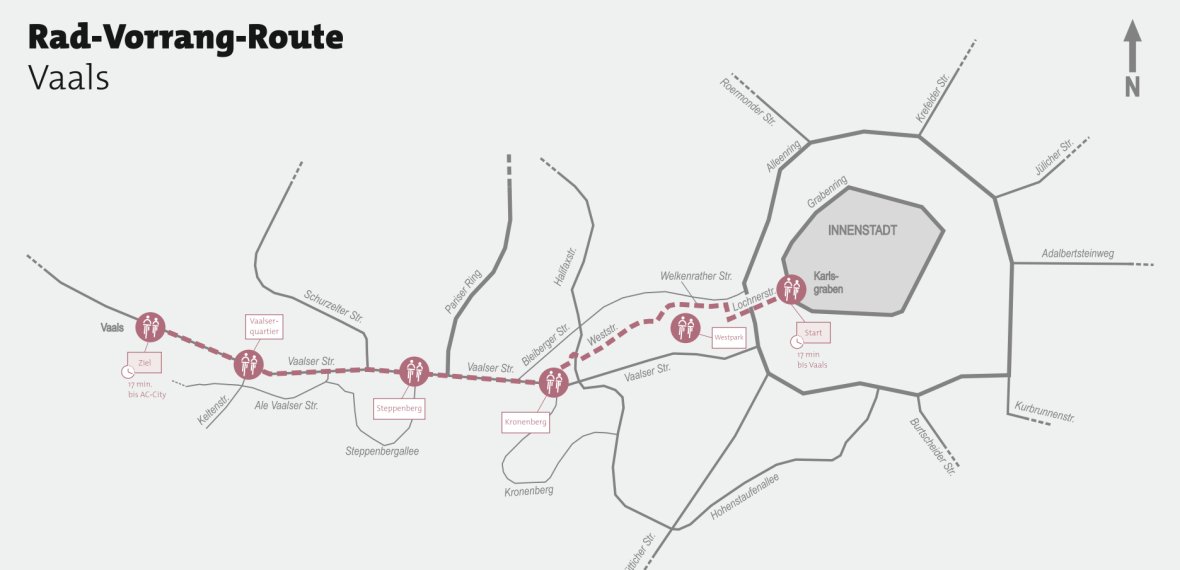
City of Aachen
Planning status
The route of the RVR Vaals was discussed on 04.07.2018 in the Laurensberg district council and on 31.10.2018 in the Aachen Mitte district council. On 12.09.2019, the Mobility Committee commissioned the administration with the successive implementation of the priority cycle network.
Council info
Search results are loaded
No templates found.
Download
Contact us
Search results are loaded
No employees found.