Diese Seite wurde automatisch übersetzt. Es kann daher zu Abweichungen oder Ungenauigkeiten im Text kommen. Verbindlich ist ausschließlich die Originalfassung. Rechtsansprüche aus Inhalten der übersetzten Version sind ausgeschlossen.

Climate measuring network

Around 100 sensor combinations will be installed in the city of Aachen in summer 2026 to measure urban climate parameters. In addition to temperature and relative humidity, these also include wind speed and direction.

Some sensors are quickly noticeable when walking through the city, others are inconspicuous, depending on how they are installed. They are often located a few meters above the ground on lanterns and traffic lights.
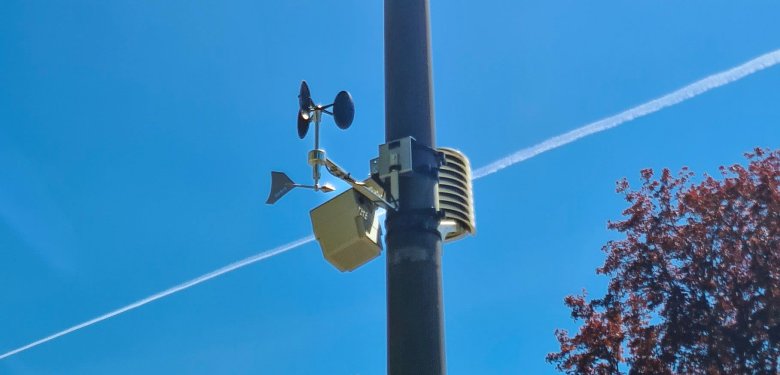
Sensor attached to a lamppost

The city has successfully applied for the “MACspeeDZ” project (“Accelerating Planning for Climate Adaptation with Urban Digital Twins in the Cities of Mannheim and Aachen”) as part of the call for proposals “Accelerating Planning for Climate Adaptation with Urban Digital Twins” issued by the Federal Ministry of Research, Technology, and Space (BMFTR). The project is managed by the German Aerospace Center (DLR). The procurement of the sensor technology is fully funded by the project.

You will notice that the measured values can vary depending on the location. It is precisely these differences that should be made visible and cold air flows and heat islands identified. The database supports the employees of the Climate and Environment (FB36) and Urban Development and Planning (FB61) departments in their decision-making regarding climate adaptation measures. This ensures that Aachen remains a city worth living in for all of us, even in the face of climate change.

Help with accessibility

  • General

    We make every effort to ensure that our websites are accessible. You can find details on this in our accessibility statement. You can send us suggestions for improvement using our"Report a barrier" feedback form.

  • Font size

    To adjust the font size, please use the following key combinations:

    Larger

    ⌘command
    +

    Smaller

    ⌘command

    Larger

    Ctrl
    +

    Smaller

    Ctrl
  • Keyboard navigation

    Use TAB and SHIFT + TAB to navigate through next/previous links, form elements and buttons.

    Use ENTER to open links and interact with elements.

  • Contrast mode

    Press the following key combination to reduce or increase the contrast:

    Enlarge

    ⌃control
    ⌥option
    ⌘command
    .

    Decrease

    ⌃control
    ⌥option
    ⌘command
    ,
    Note: The shortcuts must be activated in the system settings of the operating system.

    Press left ALT + left SHIFT + PRINT to quickly switch the high contrast mode on or off.

  • Invert colors

    Press the following key combination to switch the color inversion on and off:

    ⌃control
    ⌥option
    ⌘command
    8
    Note: The shortcuts must be activated in the system settings of the operating system.

    First activate the screen magnifier and then switch the color inversion on and off with the following key combinations:

    1. screen magnifier

    +

    2. invert colors

    Ctrl
    Old
    I
  • Screen magnifier

    Press the following key combinations to use the screen magnifier:

    Switch on/off

    ⌥option
    ⌘command
    8

    Enlarge view

    ⌥option
    ⌘command
    =

    Reduce view

    ⌥option
    ⌘command
    Note: The shortcuts must be activated in the system settings of the operating system.

    Switch on / Enlarge view

    +

    Reduce view