Diese Seite wurde automatisch übersetzt. Es kann daher zu Abweichungen oder Ungenauigkeiten im Text kommen. Verbindlich ist ausschließlich die Originalfassung. Rechtsansprüche aus Inhalten der übersetzten Version sind ausgeschlossen.

Press releases

Tree protection: railings for the lime tree bed on Kaiserplatz

The lime tree planted around ten years ago on Kaiserplatz in the traffic island - at the time a "large tree" planted with great effort using a crane truck - is becoming increasingly weakened. The reason: although the bed around the tree was given a dense underplanting at the time, it is used by pedestrians to cross the road. This intensive use has led to the original planting being pushed back further and further. The area around the tree root has been heavily compacted and trampled down over the years. There is an urgent need for action to protect the tree.

For this reason, the Climate and Environment Department has commissioned the installation of a railing to protect the sensitive root area of the lime tree. The soil will then be loosened and the bed replanted by Aachener Stadtbetrieb.

On Monday, April 27, the foundation work will begin and then the custom-made railing will be installed by the metalworker by Thursday, April 30. This will be followed by the loosening and planting work.

As the traffic situation on Kaiserplatz is already confusing and is likely to be made even more difficult by the construction work, the city is asking all road users to take particular care.
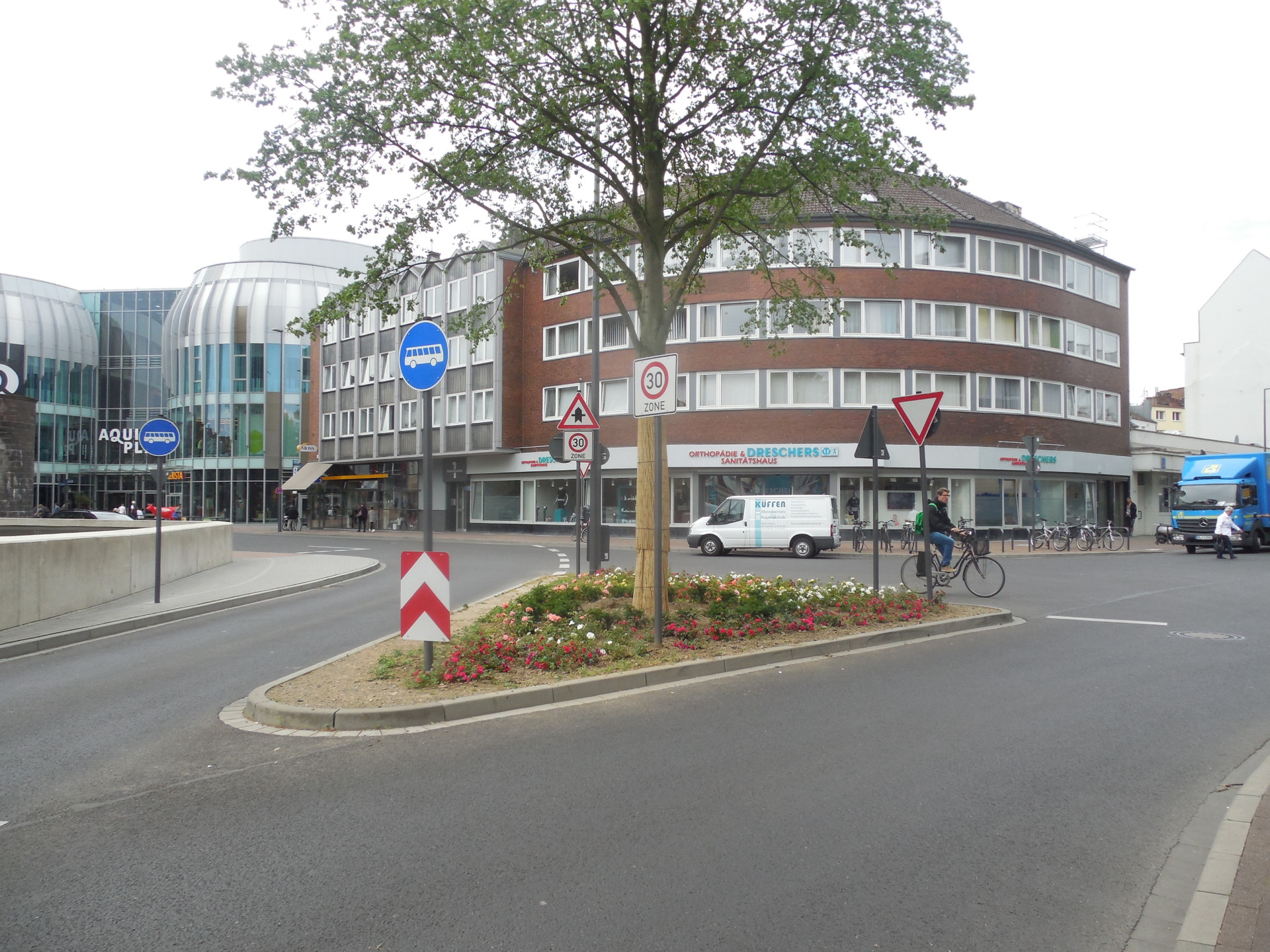
Flowering underplanting: In 2016, the bed around the lime tree was still lushly planted and protected the tree roots.
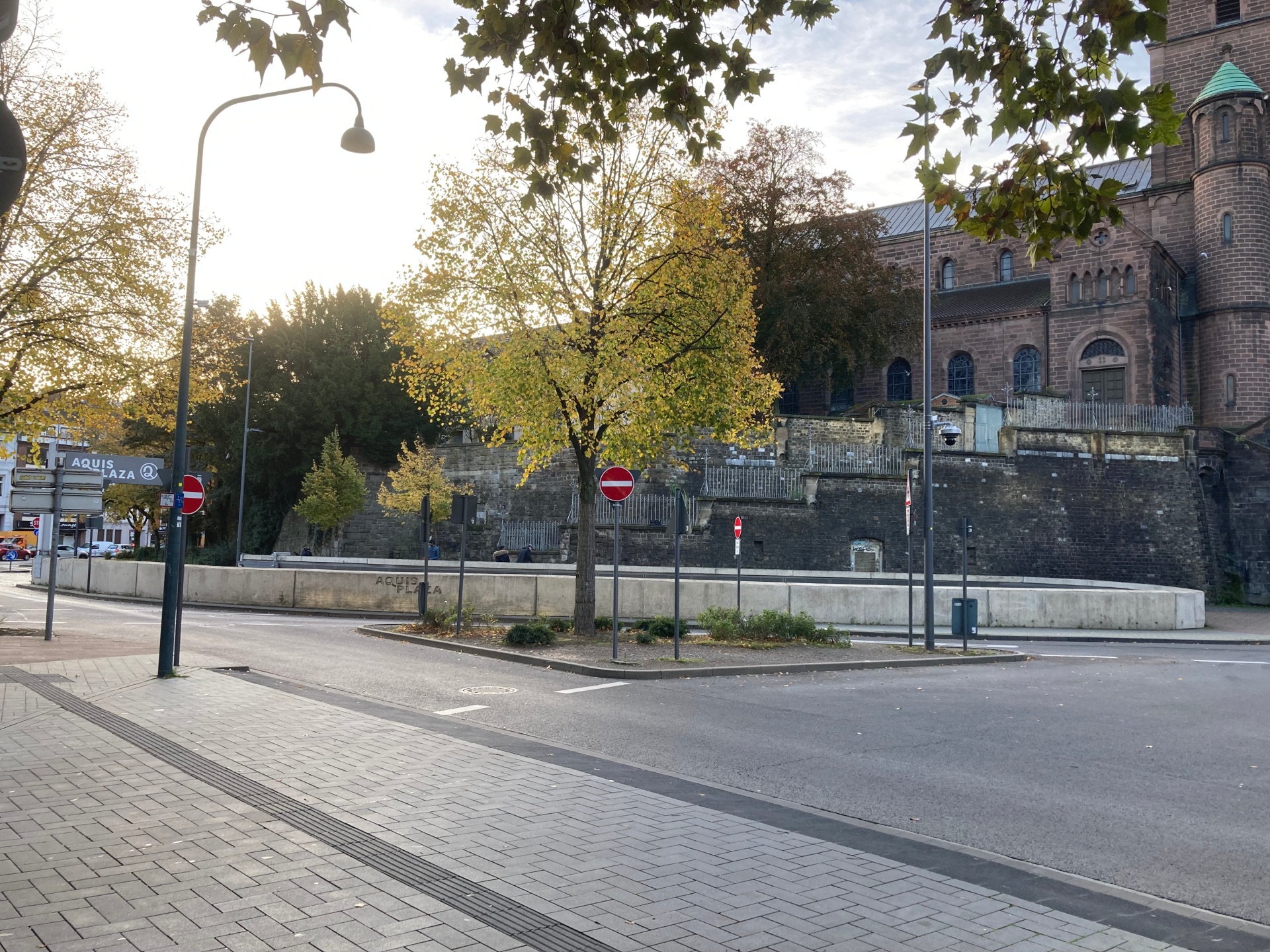
Stuck: In 2026, the bed under the lime tree is so compacted that the tree's roots are damaged.


You can subscribe to our RSS feed for our press releases here https://www.aachen.de/rss-feed-pressemitteilungen/rss.xml

Help with accessibility

  • General

    We make every effort to ensure that our websites are accessible. You can find details on this in our accessibility statement. You can send us suggestions for improvement using our"Report a barrier" feedback form.

  • Font size

    To adjust the font size, please use the following key combinations:

    Larger

    ⌘command
    +

    Smaller

    ⌘command

    Larger

    Ctrl
    +

    Smaller

    Ctrl
  • Keyboard navigation

    Use TAB and SHIFT + TAB to navigate through next/previous links, form elements and buttons.

    Use ENTER to open links and interact with elements.

  • Contrast mode

    Press the following key combination to reduce or increase the contrast:

    Enlarge

    ⌃control
    ⌥option
    ⌘command
    .

    Decrease

    ⌃control
    ⌥option
    ⌘command
    ,
    Note: The shortcuts must be activated in the system settings of the operating system.

    Press left ALT + left SHIFT + PRINT to quickly switch the high contrast mode on or off.

  • Invert colors

    Press the following key combination to switch the color inversion on and off:

    ⌃control
    ⌥option
    ⌘command
    8
    Note: The shortcuts must be activated in the system settings of the operating system.

    First activate the screen magnifier and then switch the color inversion on and off with the following key combinations:

    1. screen magnifier

    +

    2. invert colors

    Ctrl
    Old
    I
  • Screen magnifier

    Press the following key combinations to use the screen magnifier:

    Switch on/off

    ⌥option
    ⌘command
    8

    Enlarge view

    ⌥option
    ⌘command
    =

    Reduce view

    ⌥option
    ⌘command
    Note: The shortcuts must be activated in the system settings of the operating system.

    Switch on / Enlarge view

    +

    Reduce view