Diese Seite wurde automatisch übersetzt. Es kann daher zu Abweichungen oder Ungenauigkeiten im Text kommen. Verbindlich ist ausschließlich die Originalfassung. Rechtsansprüche aus Inhalten der übersetzten Version sind ausgeschlossen.

CANCELED: Experimenting with the Energy Kit
Education

Category: Education

CANCELED: Experimenting with the Energy Kit

The event has been canceled.

How much energy does a computer use? How warm is it in the classroom? Is the classroom bright enough for learning? How much water actually flows through our faucet?
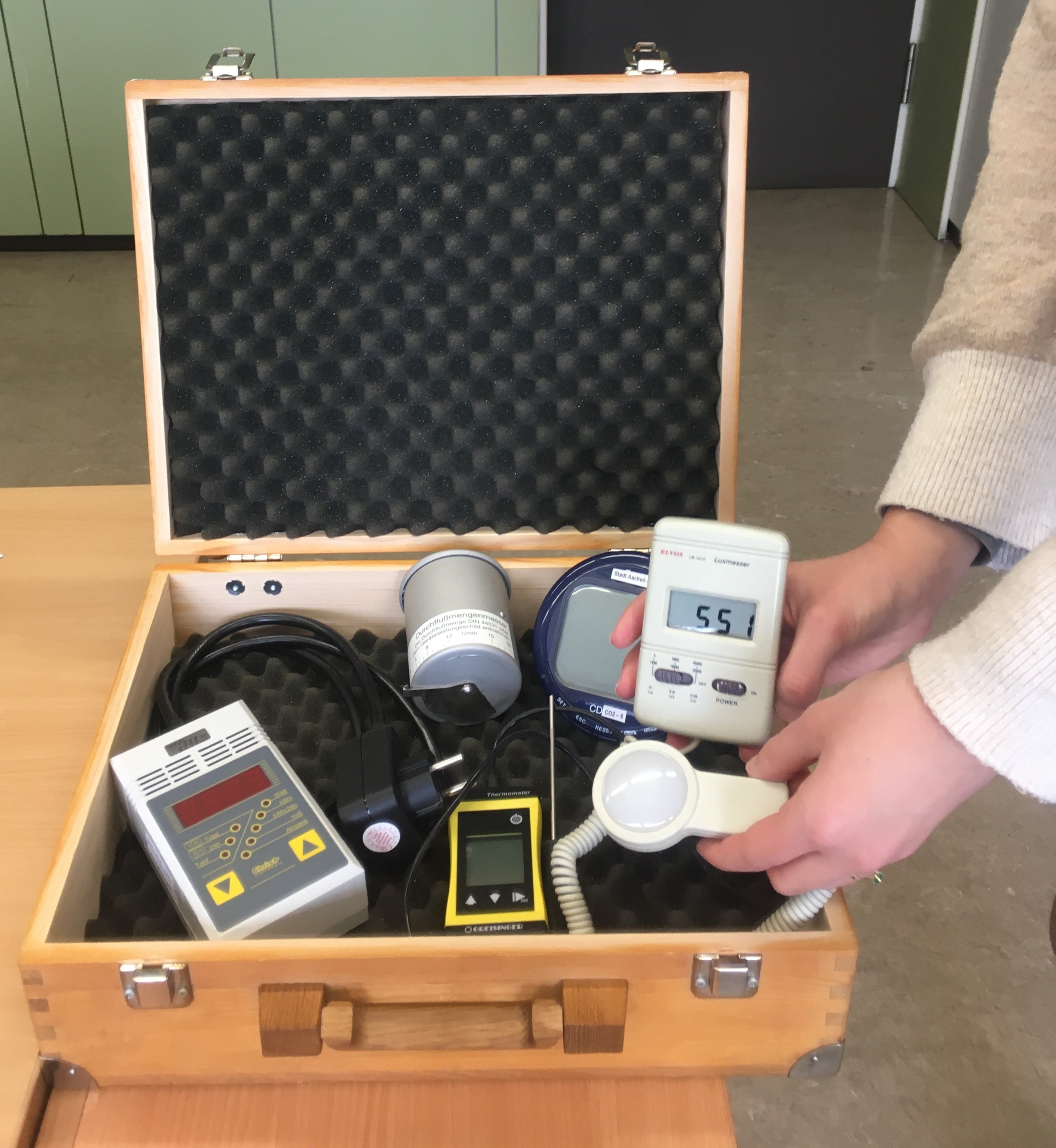
You can find out these things and much more with the energy kit, which is loaned to schools free of charge.

The energy kit contains a total of five different measuring devices: a thermometer, an ammeter, a measuring cup for flow measurement, a CO2 meter, and a lux meter.
With the help of these devices, electricity, heat, and water consumption can be made visible and tangible.

As part of the workshop, we’d like to briefly introduce elementary school teachers to the measuring devices in the Energy Kit and then try them out together.
Target audience: Elementary school
teachers. Facilitator: Regina Bähr, Building Management, City of Aachen

. The room number will be provided upon registration.

Organizer

Education for Sustainable Development" team

bne@mail.aachen.de

Education for sustainable development

  • Education
  • ESD

Help with accessibility

  • General

    We make every effort to ensure that our websites are accessible. You can find details on this in our accessibility statement. You can send us suggestions for improvement using our"Report a barrier" feedback form.

  • Font size

    To adjust the font size, please use the following key combinations:

    Larger

    ⌘command
    +

    Smaller

    ⌘command
    –

    Larger

    Ctrl
    +

    Smaller

    Ctrl
    –
  • Keyboard navigation

    Use TAB and SHIFT + TAB to navigate through next/previous links, form elements and buttons.

    Use ENTER to open links and interact with elements.

  • Contrast mode

    Press the following key combination to reduce or increase the contrast:

    Enlarge

    ⌃control
    ⌥option
    ⌘command
    .

    Decrease

    ⌃control
    ⌥option
    ⌘command
    ,
    Note: The shortcuts must be activated in the system settings of the operating system.

    Press left ALT + left SHIFT + PRINT to quickly switch the high contrast mode on or off.

  • Invert colors

    Press the following key combination to switch the color inversion on and off:

    ⌃control
    ⌥option
    ⌘command
    8
    Note: The shortcuts must be activated in the system settings of the operating system.

    First activate the screen magnifier and then switch the color inversion on and off with the following key combinations:

    1. screen magnifier

    +

    2. invert colors

    Ctrl
    Old
    I
  • Screen magnifier

    Press the following key combinations to use the screen magnifier:

    Switch on/off

    ⌥option
    ⌘command
    8

    Enlarge view

    ⌥option
    ⌘command
    =

    Reduce view

    ⌥option
    ⌘command
    –
    Note: The shortcuts must be activated in the system settings of the operating system.

    Switch on / Enlarge view

    +

    Reduce view

    –