Diese Seite wurde automatisch übersetzt. Es kann daher zu Abweichungen oder Ungenauigkeiten im Text kommen. Verbindlich ist ausschließlich die Originalfassung. Rechtsansprüche aus Inhalten der übersetzten Version sind ausgeschlossen.

Traces of Aachen's History: The Heißberg Cemetery in Burtscheid—A Walking Tour with Dr. Holger A. Dux
Education

Category: Education

Traces of Aachen's History: The Heißberg Cemetery in Burtscheid—A Walking Tour with Dr. Holger A. Dux

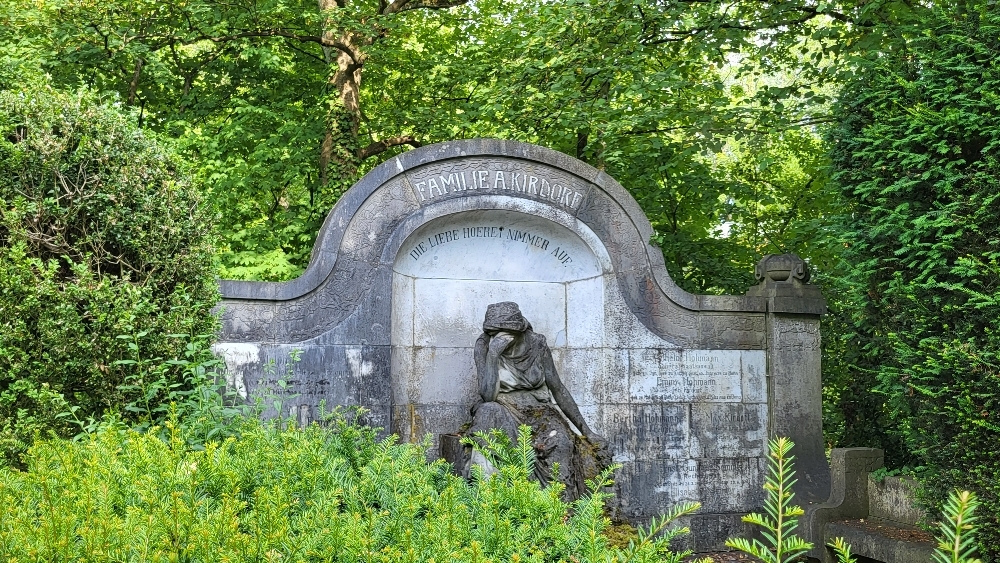
Aachen has a number of historic cemeteries: one of the most interesting is the one in Burtscheid. By the mid-19th century, the old cemetery near St. Michael’s Church was completely full, so the parish felt compelled to have a new burial ground established outside the residential area, along the road to Lichtenbusch.
Even today, the gravestones serve as a reminder of prominent families such as the Klauseners, Erckens, von Halfern, Kirdorfs, and Pastors. Imposing monuments were commissioned in honor of the soldiers who fell in the wars of the 19th century. In addition to explanations of the stylistic history of the graves from various eras, the tour includes stories about some of the Burtscheid residents buried here. Meeting

point: Main entrance to Heißberg Cemetery;
Cost: €9 / reduced €7

; Registration at: https://www.vhs-aachen.de/kurssuche/kurs/Spuren-Aachener-Geschichte-Der-Heissbergfriedhof-in-Burtscheid/261-10284#inhalt

Organizer

vhs Aachen

vhs-pr@mail.aachen.de

  • Education
  • Leisure time
  • Information
  • City tour
  • Event

Help with accessibility

  • General

    We make every effort to ensure that our websites are accessible. You can find details on this in our accessibility statement. You can send us suggestions for improvement using our"Report a barrier" feedback form.

  • Font size

    To adjust the font size, please use the following key combinations:

    Larger

    ⌘command
    +

    Smaller

    ⌘command
    –

    Larger

    Ctrl
    +

    Smaller

    Ctrl
    –
  • Keyboard navigation

    Use TAB and SHIFT + TAB to navigate through next/previous links, form elements and buttons.

    Use ENTER to open links and interact with elements.

  • Contrast mode

    Press the following key combination to reduce or increase the contrast:

    Enlarge

    ⌃control
    ⌥option
    ⌘command
    .

    Decrease

    ⌃control
    ⌥option
    ⌘command
    ,
    Note: The shortcuts must be activated in the system settings of the operating system.

    Press left ALT + left SHIFT + PRINT to quickly switch the high contrast mode on or off.

  • Invert colors

    Press the following key combination to switch the color inversion on and off:

    ⌃control
    ⌥option
    ⌘command
    8
    Note: The shortcuts must be activated in the system settings of the operating system.

    First activate the screen magnifier and then switch the color inversion on and off with the following key combinations:

    1. screen magnifier

    +

    2. invert colors

    Ctrl
    Old
    I
  • Screen magnifier

    Press the following key combinations to use the screen magnifier:

    Switch on/off

    ⌥option
    ⌘command
    8

    Enlarge view

    ⌥option
    ⌘command
    =

    Reduce view

    ⌥option
    ⌘command
    –
    Note: The shortcuts must be activated in the system settings of the operating system.

    Switch on / Enlarge view

    +

    Reduce view

    –