Diese Seite wurde automatisch übersetzt. Es kann daher zu Abweichungen oder Ungenauigkeiten im Text kommen. Verbindlich ist ausschließlich die Originalfassung. Rechtsansprüche aus Inhalten der übersetzten Version sind ausgeschlossen.

My Fair Lady

Matthias Baus
Matthias Baus
Culture

Category: Culture

My Fair Lady

Musical by Frederick Loewe

Book and lyrics by Alan Jay Lerner
Based on George Bernard Shaw's "Pygmalion" and the film by Gabriel Pascal
English with German surtitles.

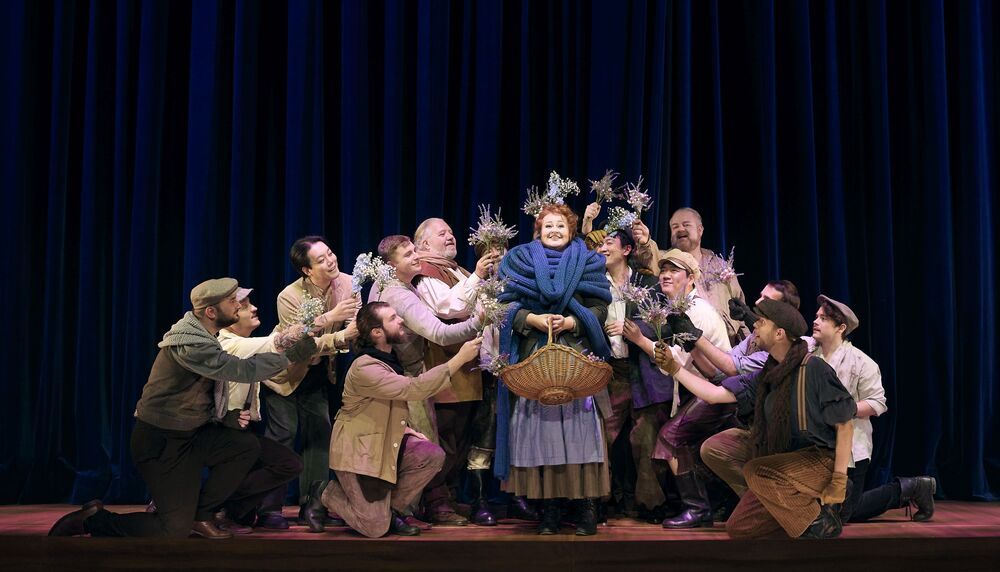
London 1912. Outside the opera house, the linguist Professor Higgins notices the flower seller Eliza Doolittle, who babbles away in a coarse "Cockney" dialect. Fascinated and horrified, Higgins bets that he can turn Eliza into a "fine lady" in just a few months using his linguistic methods. She is to demonstrate her skills at the horse races in Ascot and at the diplomatic ball. However, the question remains as to who is "educating" whom. Because the emancipated Eliza also turns Higgins' life upside down.

In George Bernhard Shaw's dramatic original "Pygmalion", as in the musical by Alan Jay Lerner and Frederick Loewe, a person is shaped by their language. "My Fair Lady" won the Tony Award for "Best Musical" in 1956 and became world-famous in the film version with Audrey Hepburn. The whole world is also looking to Aachen in 2026 for the FEI World Equestrian Games (FEI World Championships). A fitting occasion for artistic director and director Elena Tzavara to celebrate this with the great musical classic "My Fair Lady" and the central Ascot scene on the Aachen stage.

There are still performances on 26.06. | 02.07. | 09.07.

  • World Equestrian Games
  • Theater

Help with accessibility

  • General

    We make every effort to ensure that our websites are accessible. You can find details on this in our accessibility statement. You can send us suggestions for improvement using our"Report a barrier" feedback form.

  • Font size

    To adjust the font size, please use the following key combinations:

    Larger

    ⌘command
    +

    Smaller

    ⌘command
    –

    Larger

    Ctrl
    +

    Smaller

    Ctrl
    –
  • Keyboard navigation

    Use TAB and SHIFT + TAB to navigate through next/previous links, form elements and buttons.

    Use ENTER to open links and interact with elements.

  • Contrast mode

    Press the following key combination to reduce or increase the contrast:

    Enlarge

    ⌃control
    ⌥option
    ⌘command
    .

    Decrease

    ⌃control
    ⌥option
    ⌘command
    ,
    Note: The shortcuts must be activated in the system settings of the operating system.

    Press left ALT + left SHIFT + PRINT to quickly switch the high contrast mode on or off.

  • Invert colors

    Press the following key combination to switch the color inversion on and off:

    ⌃control
    ⌥option
    ⌘command
    8
    Note: The shortcuts must be activated in the system settings of the operating system.

    First activate the screen magnifier and then switch the color inversion on and off with the following key combinations:

    1. screen magnifier

    +

    2. invert colors

    Ctrl
    Old
    I
  • Screen magnifier

    Press the following key combinations to use the screen magnifier:

    Switch on/off

    ⌥option
    ⌘command
    8

    Enlarge view

    ⌥option
    ⌘command
    =

    Reduce view

    ⌥option
    ⌘command
    –
    Note: The shortcuts must be activated in the system settings of the operating system.

    Switch on / Enlarge view

    +

    Reduce view

    –