Diese Seite wurde automatisch übersetzt. Es kann daher zu Abweichungen oder Ungenauigkeiten im Text kommen. Verbindlich ist ausschließlich die Originalfassung. Rechtsansprüche aus Inhalten der übersetzten Version sind ausgeschlossen.

Tatort Büchel - What is planned? Event as part of the 19th aachen fenster e.V.
Planning and building

Category: Planning and building

Tatort Büchel - What is planned? Event as part of the 19th aachen fenster e.V.

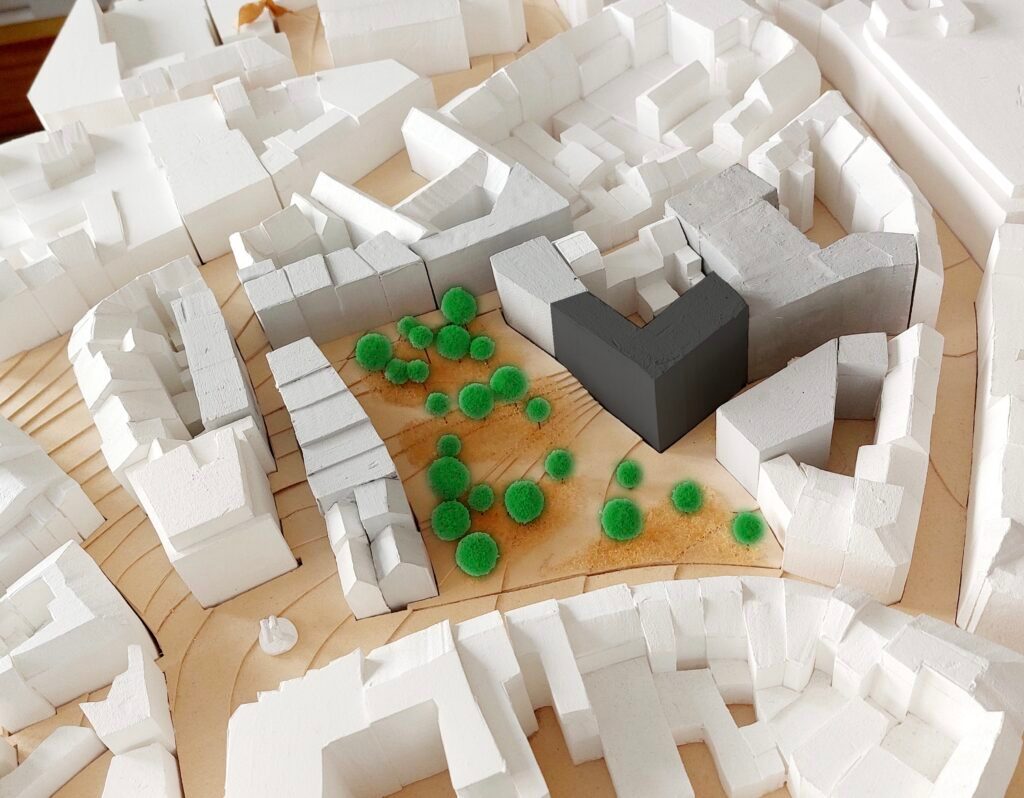
For over twenty years, there has been an intensive discussion about the redesign of the Bücher-Areal. After several unsuccessful competitions, the Wohnen - Wiese - Wissen concepts were launched and are now being implemented.

In addition to the open space planning, this also includes the Wissen building block, which the Fraunhofer IEG will realize from 2027. Once completed, over 60 researchers will not only develop and test new energy and climate protection technologies here, but also foster dialogue with urban society, citizens and the business community.

In our event, we would like to shed light on the project from the aspects of urban planning framework, utilization concept and architecture.

Invited are:

  • Christoph Vogt, Managing Director SEGA GmbH & Co. KG
  • Prof. Dr. Rolf Bracke, Director of the Fraunhofer IEG
  • Martin Reuter, Chairman of the Management Board of Ingenhoven Architekten


The evening will be hosted by Björn Schötten

Organizer

SEGA Städtische Entwicklungsgesellschaft Aachen GmbH & Co. KG with aachenfenster e.V.

a.eickhoff@sega.ac

buechel-aachen.de

  • Citizens' dialog

Help with accessibility

  • General

    We make every effort to ensure that our websites are accessible. You can find details on this in our accessibility statement. You can send us suggestions for improvement using our"Report a barrier" feedback form.

  • Font size

    To adjust the font size, please use the following key combinations:

    Larger

    ⌘command
    +

    Smaller

    ⌘command

    Larger

    Ctrl
    +

    Smaller

    Ctrl
  • Keyboard navigation

    Use TAB and SHIFT + TAB to navigate through next/previous links, form elements and buttons.

    Use ENTER to open links and interact with elements.

  • Contrast mode

    Press the following key combination to reduce or increase the contrast:

    Enlarge

    ⌃control
    ⌥option
    ⌘command
    .

    Decrease

    ⌃control
    ⌥option
    ⌘command
    ,
    Note: The shortcuts must be activated in the system settings of the operating system.

    Press left ALT + left SHIFT + PRINT to quickly switch the high contrast mode on or off.

  • Invert colors

    Press the following key combination to switch the color inversion on and off:

    ⌃control
    ⌥option
    ⌘command
    8
    Note: The shortcuts must be activated in the system settings of the operating system.

    First activate the screen magnifier and then switch the color inversion on and off with the following key combinations:

    1. screen magnifier

    +

    2. invert colors

    Ctrl
    Old
    I
  • Screen magnifier

    Press the following key combinations to use the screen magnifier:

    Switch on/off

    ⌥option
    ⌘command
    8

    Enlarge view

    ⌥option
    ⌘command
    =

    Reduce view

    ⌥option
    ⌘command
    Note: The shortcuts must be activated in the system settings of the operating system.

    Switch on / Enlarge view

    +

    Reduce view