
City of Aachen Rescue Service School
The Aachen Rescue Service School is a state-recognized emergency paramedic school. In addition to the training of paramedics and the annual further and advanced training of almost 400 employees, training to become an emergency paramedic is one of the core elements of the school. The fact that the paramedic school is part of the Aachen professional fire department results in special training features that are unique and thus represent a unique selling point.

City of Aachen
Telemedicine
Trainees come into contact with telemedicine at an early stage and spend time with emergency doctors.
SRG Aachen
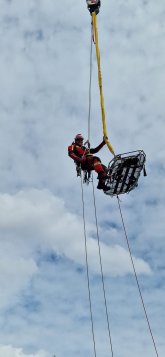
Special rescue
As a trainee, you will experience first-hand what it means to apply medical skills in extraordinary situations.
City of Aachen
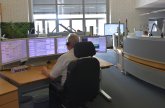
Control center
Work shadowing with experienced control center dispatchers is an integral part of the training plan.

City of Aachen
Boundless work
We regularly conduct excursions to cross-border control centers and rescue stations to get to know the rescue service systems of neighboring countries at first hand.
The training in detail
What tasks do emergency paramedics have?
Emergency paramedics have the highest level of non-medical training in emergency medicine in the whole of Germany. They are alerted to unforeseeable emergencies in the urban area and stabilize the health of patients at the scene so that they can be transported safely and reliably to a suitable hospital. In doing so, they have a leadership responsibility in teamwork and specify the measures to be taken.
How long does the training last and where does it take place?
The training usually lasts three years. School lessons take place at the rescue service school in Aachen. The work placements at the fire and rescue stations take place at the Aachen professional fire department and the clinical placements take place in the hospitals of the city of Aachen and the surrounding area.
What happens after the apprenticeship?
After successfully completing your training, we would like to offer you seamless technical firefighting training at the Aachen professional fire department. With a further 18 months of training, you will be trained to become a fire officer as a civil servant and can be deployed in a variety of ways from this point on. We would like to make a lifelong and loyal commitment to you and therefore offer you one of the most versatile and sustainable professions: Fire and rescue service!
Contact us
Search results are loaded
No departments found.