Diese Seite wurde automatisch übersetzt. Es kann daher zu Abweichungen oder Ungenauigkeiten im Text kommen. Verbindlich ist ausschließlich die Originalfassung. Rechtsansprüche aus Inhalten der übersetzten Version sind ausgeschlossen.

Soerser Weg (Soerser Winkel – Krefelder Straße)
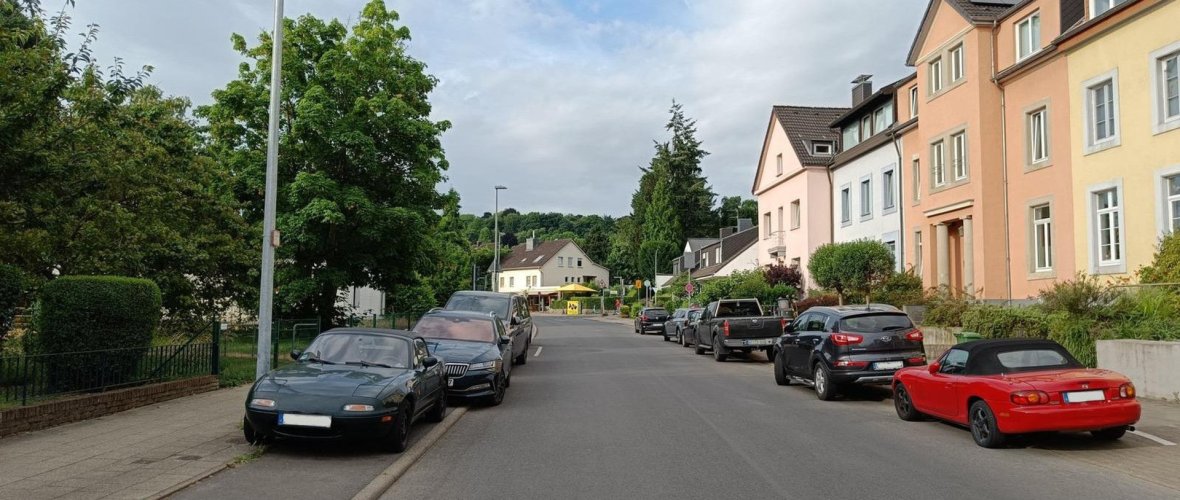
A View of Soerser Weg
City of Aachen

As of November 2026

Soerser Weg is currently being considered in two planning projects: First, it is part of the Berensberg priority bike route and is to be upgraded for bicycle traffic as part of that project. Second, following a request submitted to the Citizens’ Forum, a short-term improvement for cyclists and pedestrians has already been approved by amending the parking regulations. You can find more detailed information on both projects below.

Map

Planning the Berensberg Bicycle Priority Route

As part of the Berensberg Priority Bicycle Route, a wide bicycle lane has already been marked on Krefelder Straße. Political decisions have been secured for additional sections of the route (the “Bastei” intersection and the Rolandstraße/Krefelder Straße intersection). Soerser Weg is the next section of the Berensberg RVR for which a plan for the entire road space is to be developed. The goal is to hold a public discussion in 2027. You can find all information about the Berensberg RVR here.

Amendment to the Parking Regulations to Ensure Uninterrupted Accessibility of the Bike Path

In anticipation of the plans for Soerser Weg—which are still to be developed as part of the “Bikes First” route—a decision was already made in June 2026 to amend the parking regulations on a section of Soerser Weg (link to the decision document). This measure is intended to restore continuous access to the non-mandatory bike path in the direction toward the city center. This decision followed a corresponding motion that had been discussed at the Citizens’ Forum on June 24, 2025.

Based on the planning decision made in June 2026, a detailed signage and marking plan was developed and coordinated with all stakeholders. As a result, the project has since been successfully put out to bid: A specialized contractor has already been commissioned to carry out the work. Since road marking work is weather-dependent, the changes are expected to be implemented starting in the spring of 2027.

Contact us

No employees found.


Help with accessibility

  • General

    We make every effort to ensure that our websites are accessible. You can find details on this in our accessibility statement. You can send us suggestions for improvement using our"Report a barrier" feedback form.

  • Font size

    To adjust the font size, please use the following key combinations:

    Larger

    ⌘command
    +

    Smaller

    ⌘command
    –

    Larger

    Ctrl
    +

    Smaller

    Ctrl
    –
  • Keyboard navigation

    Use TAB and SHIFT + TAB to navigate through next/previous links, form elements and buttons.

    Use ENTER to open links and interact with elements.

  • Contrast mode

    Press the following key combination to reduce or increase the contrast:

    Enlarge

    ⌃control
    ⌥option
    ⌘command
    .

    Decrease

    ⌃control
    ⌥option
    ⌘command
    ,
    Note: The shortcuts must be activated in the system settings of the operating system.

    Press left ALT + left SHIFT + PRINT to quickly switch the high contrast mode on or off.

  • Invert colors

    Press the following key combination to switch the color inversion on and off:

    ⌃control
    ⌥option
    ⌘command
    8
    Note: The shortcuts must be activated in the system settings of the operating system.

    First activate the screen magnifier and then switch the color inversion on and off with the following key combinations:

    1. screen magnifier

    +

    2. invert colors

    Ctrl
    Old
    I
  • Screen magnifier

    Press the following key combinations to use the screen magnifier:

    Switch on/off

    ⌥option
    ⌘command
    8

    Enlarge view

    ⌥option
    ⌘command
    =

    Reduce view

    ⌥option
    ⌘command
    –
    Note: The shortcuts must be activated in the system settings of the operating system.

    Switch on / Enlarge view

    +

    Reduce view

    –