Diese Seite wurde automatisch übersetzt. Es kann daher zu Abweichungen oder Ungenauigkeiten im Text kommen. Verbindlich ist ausschließlich die Originalfassung. Rechtsansprüche aus Inhalten der übersetzten Version sind ausgeschlossen.

September Highlights

Let's Groove

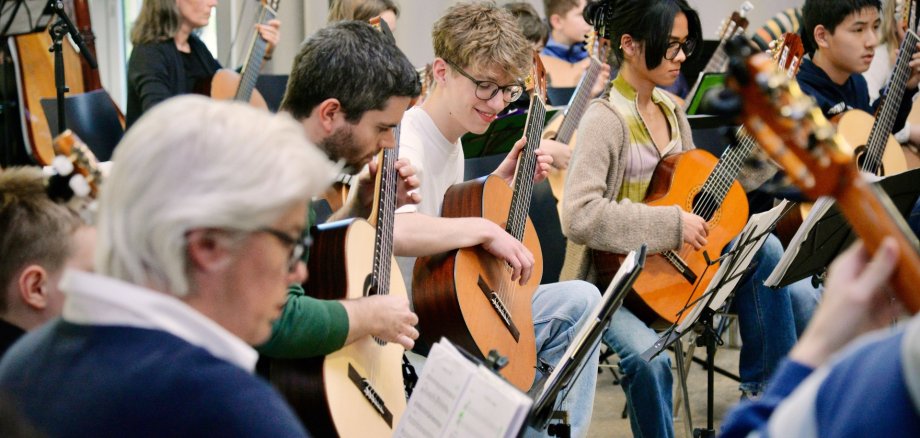
After an intensive weekend of rehearsals, the GO Guitar Orchestra of the Aachen Music School, together with guest performers, will present its new concert program, “Let’s Groove.” Around 70 guitarists will take the stage for two evenings of concerts featuring well-known melodies and rousing rhythms.

The first concert will take place on Saturday, September 26, 2026, at 5:00 p.m. at Depot Aachen, Talstraße 2. One day later, on Sunday, September 27, 2026, also at 5:00 p.m., the ensemble will perform at the community center of the Evangelical Parish of Meiderich in Duisburg.

The intergenerational orchestra brings together students and teachers from the Aachen City Music School with guests from the Duisburg School of Music and Art. The project is a collaboration between the music schools of the City of Aachen and the City of Duisburg and the international guitar festival speGTRa. Csaba Székely serves as the musical director.

The program features groovy arrangements of songs by Michael Jackson, Sting, Imagine Dragons, and others, as well as well-known movie soundtracks. The audience can look forward to a diverse concert full of enthusiasm, musical energy, and rousing guitar riffs.

Admission is free. Following the concert, the Friends of the Aachen Music School would appreciate donations to support its work.

WHEN: Sat, Sept. 26, 5:00 p.m.

WO Depot Aachen, Talstraße 2

Help with accessibility

  • General

    We make every effort to ensure that our websites are accessible. You can find details on this in our accessibility statement. You can send us suggestions for improvement using our"Report a barrier" feedback form.

  • Font size

    To adjust the font size, please use the following key combinations:

    Larger

    ⌘command
    +

    Smaller

    ⌘command

    Larger

    Ctrl
    +

    Smaller

    Ctrl
  • Keyboard navigation

    Use TAB and SHIFT + TAB to navigate through next/previous links, form elements and buttons.

    Use ENTER to open links and interact with elements.

  • Contrast mode

    Press the following key combination to reduce or increase the contrast:

    Enlarge

    ⌃control
    ⌥option
    ⌘command
    .

    Decrease

    ⌃control
    ⌥option
    ⌘command
    ,
    Note: The shortcuts must be activated in the system settings of the operating system.

    Press left ALT + left SHIFT + PRINT to quickly switch the high contrast mode on or off.

  • Invert colors

    Press the following key combination to switch the color inversion on and off:

    ⌃control
    ⌥option
    ⌘command
    8
    Note: The shortcuts must be activated in the system settings of the operating system.

    First activate the screen magnifier and then switch the color inversion on and off with the following key combinations:

    1. screen magnifier

    +

    2. invert colors

    Ctrl
    Old
    I
  • Screen magnifier

    Press the following key combinations to use the screen magnifier:

    Switch on/off

    ⌥option
    ⌘command
    8

    Enlarge view

    ⌥option
    ⌘command
    =

    Reduce view

    ⌥option
    ⌘command
    Note: The shortcuts must be activated in the system settings of the operating system.

    Switch on / Enlarge view

    +

    Reduce view