Diese Seite wurde automatisch übersetzt. Es kann daher zu Abweichungen oder Ungenauigkeiten im Text kommen. Verbindlich ist ausschließlich die Originalfassung. Rechtsansprüche aus Inhalten der übersetzten Version sind ausgeschlossen.

Experimenting with the energy case
Education

Category: Education

Experimenting with the energy case

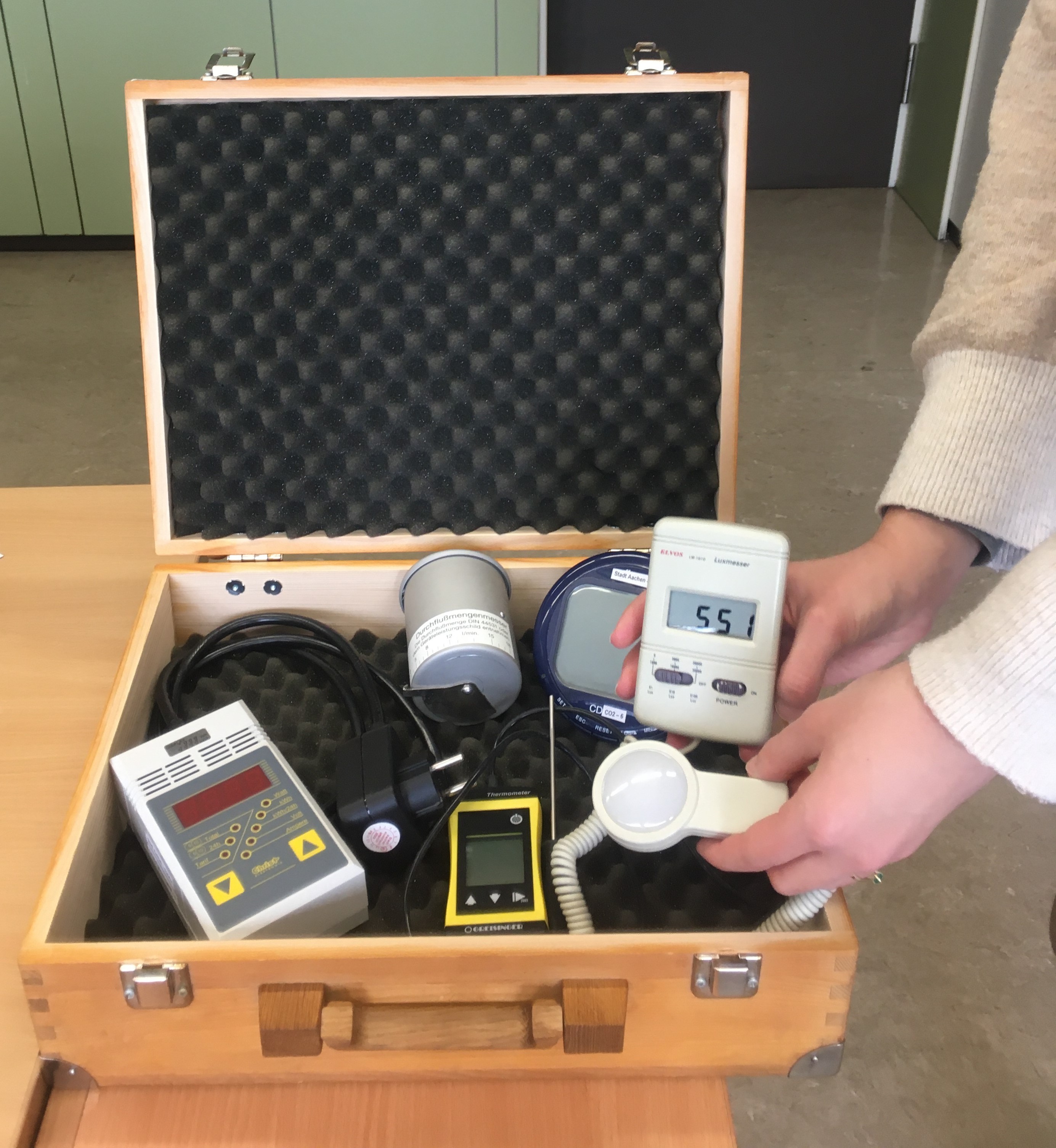
How much energy does a computer consume? How warm is it in the classroom? Is it bright enough in the classroom for learning? How much water actually flows through our taps?
You can find out all this and much more with the energy case, which is loaned out to schools free of charge.

The energy case contains a total of five different measuring devices: a thermometer, an electricity meter, a measuring cup for flow measurement, a Co2 meter and a luxmeter.
These measuring devices can be used to make electricity, heat and water consumption visible and tangible.

As part of the workshop, we would like to briefly introduce primary school teachers to the measuring devices in the energy case and then try them out together.
Target group: Primary school teachers
Leader: Regina Bähr, Building Management of the City of Aachen

Date:October 14, 2026

Time:15:30 - 17:00

Organizer

Education for Sustainable Development" team

bne@mail.aachen.de

aachen.de

  • Education
  • ESD

Help with accessibility

  • General

    We make every effort to ensure that our websites are accessible. You can find details on this in our accessibility statement. You can send us suggestions for improvement using our"Report a barrier" feedback form.

  • Font size

    To adjust the font size, please use the following key combinations:

    Larger

    ⌘command
    +

    Smaller

    ⌘command

    Larger

    Ctrl
    +

    Smaller

    Ctrl
  • Keyboard navigation

    Use TAB and SHIFT + TAB to navigate through next/previous links, form elements and buttons.

    Use ENTER to open links and interact with elements.

  • Contrast mode

    Press the following key combination to reduce or increase the contrast:

    Enlarge

    ⌃control
    ⌥option
    ⌘command
    .

    Decrease

    ⌃control
    ⌥option
    ⌘command
    ,
    Note: The shortcuts must be activated in the system settings of the operating system.

    Press left ALT + left SHIFT + PRINT to quickly switch the high contrast mode on or off.

  • Invert colors

    Press the following key combination to switch the color inversion on and off:

    ⌃control
    ⌥option
    ⌘command
    8
    Note: The shortcuts must be activated in the system settings of the operating system.

    First activate the screen magnifier and then switch the color inversion on and off with the following key combinations:

    1. screen magnifier

    +

    2. invert colors

    Ctrl
    Old
    I
  • Screen magnifier

    Press the following key combinations to use the screen magnifier:

    Switch on/off

    ⌥option
    ⌘command
    8

    Enlarge view

    ⌥option
    ⌘command
    =

    Reduce view

    ⌥option
    ⌘command
    Note: The shortcuts must be activated in the system settings of the operating system.

    Switch on / Enlarge view

    +

    Reduce view